


I have subscribed to NordVPN, canceled it, and signed back up more times than I would like to admit, which tells you most of what you need to know before the verdict does. It is the VPN I keep returning to. Heading into 2026 it is still the one I would put in front of almost anyone who asks me what to install: quick enough that I forget it is running, private in ways that outside auditors have checked, and reliable at getting into the streaming libraries I care about from wherever I happen to be.
It is not the cheapest option on my best VPNs list, and a couple of rivals beat it on a single feature. But no other provider I have lived with does this many things well at once. This review is the long version of why, built from years of daily use across more countries and more questionable WiFi networks than I can count, and cross-checked against the independent testing and audits that matter. My rating: 4.7 out of 5.
30-day money-back guarantee, cancel anytime.
Table of Contents
NordVPN at a glance
Before the deep dive, here is the short version of what I love and what I would change after years of living with it.
What it gets right:
- NordLynx keeps it fast enough that I forget it is on, even on long-haul connections.
- The no-logs policy has been checked by outside auditors several times, on servers that run entirely from RAM.
- It gets into Netflix, BBC iPlayer, Disney+, and almost everything else I point it at.
- The extras are genuinely useful: Threat Protection Pro, Meshnet, Dark Web Monitor, and an optional dedicated IP.
- The 24/7 live chat has solved my problems instead of reading me a script.
- Obfuscated servers give it a real track record in countries that try to block VPNs.
What I would change:
- The monthly plan is expensive. The value only shows up if you commit to a long term.
- Split tunneling is limited to the Windows and Android apps.
- There is no port forwarding, which a few torrenting power users will miss.
- The cheapest tier strips out the Threat Protection suite that makes the apps feel complete.
| Key facts | NordVPN |
|---|---|
| Price | From about $3.09/mo (2-year plan) |
| Money-back guarantee | 30 days |
| Servers | 7,200+ in 110+ countries (company figure; testers cite up to 9,300) |
| Simultaneous devices | 10 |
| Jurisdiction | Panama |
| Protocols | NordLynx (WireGuard), OpenVPN, IKEv2, NordWhisper |
| Encryption | AES-256 / ChaCha20 |
| Logging | No-logs, independently audited (RAM-only servers) |
| Streaming | Netflix, BBC iPlayer, Disney+, Hulu, Prime Video, Max |
| Support | 24/7 live chat, email, help center |
Who NordVPN is for
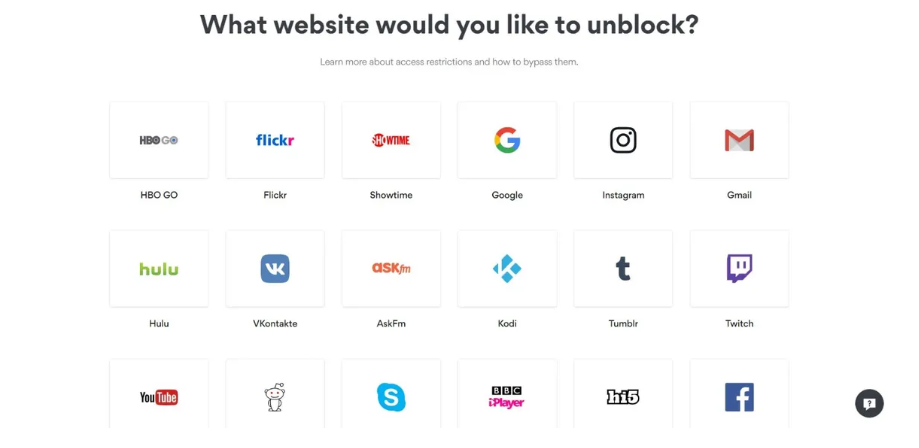
NordVPN is the right call for the person who wants one VPN to handle everything and does not want to become an expert to use it. That covers most people: you want privacy on public WiFi, you want to watch your home streaming services when you travel, you want your internet provider to stop logging your every move, and maybe you torrent now and then. It is also the one I would hand to a frequent traveler, because its obfuscation works in places where lesser VPNs simply fail.
To make that concrete, here is who I have in mind. The privacy-minded user who wants their browsing kept from their internet provider, backed by a no-logs policy that has been audited. The streamer who travels and wants their home Netflix, iPlayer, or Disney+ to follow them across borders. The remote worker living on hotel and cafe WiFi who needs every connection encrypted by default. The occasional torrenter who wants P2P handled safely without thinking about it. And the household that wants one capable subscription stretched across ten devices. If you see yourself in any of those, NordVPN is built for the way you use the internet.
It is less obviously the pick if your single priority is the lowest possible price, where Surfshark does more for less, or if you want a provider with no corporate relationships and a perfect privacy story, where ProtonVPN and its Swiss base sit higher. For the wide middle, which is almost everyone, NordVPN is the safe, strong default. The rest of this review is the evidence.
A quick word on who makes NordVPN
NordVPN launched in 2012 and is run by Nord Security, the same company behind the NordPass password manager and NordLocker encrypted storage. It is one of the largest consumer VPNs in the world, and that scale is part of why it can run such a big server network and fund repeated independent audits. Since 2022 it has shared its parent company with Surfshark, though the two operate as separate services with their own apps, networks, and audits. None of this changes how the product behaves day to day, but it is the kind of context I would want before trusting a company with my traffic, so it belongs in a review.
Is NordVPN trustworthy?

Two questions come up whenever I recommend it, so let me clear them up. The first is a stubborn myth that NordVPN is a Russian company. It is not. It was founded by Lithuanian school friends, its parent Nord Security is headquartered in Lithuania, and the VPN service itself is registered in Panama for the privacy advantages. There is no Russian ownership and no Russian jurisdiction anywhere in the picture. The second is the 2018 breach, which I cover in full below; the short version is that it exposed no user data and triggered the move to RAM-only servers and the run of audits that define the service today. Past those two, the trust case is straightforward: an audited no-logs policy, RAM-only servers, a privacy-friendly base, and a public transparency report. Few providers can show that much paper, and it is why I am comfortable keeping it on my own devices.
Speed in everyday use

Speed is where NordVPN earns the loyalty. The protocol doing the work is NordLynx, the company’s own build on top of WireGuard, and in practice it means the connection feels close to invisible. I run it on a nearby server while I work, and the drop is small enough that video calls, large downloads, and 4K streams behave the way they would without it.
The numbers bear that out. On a 251 Mbps line, NordVPN holds downloads above 195 Mbps across nearby, mid-distance, and long-haul servers, roughly three-quarters of the base speed even on the hard routes, with smaller losses up close. In some throttled regions the speed even climbs, by up to a third, because the VPN routes around an internet provider that was slowing your traffic to begin with. Independent benchmarks land in the same place, and it all matches what I see day to day: this is a fast VPN that rarely makes me wait.
Long distance is the real test, and it is where a lot of VPNs come apart. Connecting from Southeast Asia back to a server in the United States, I still get enough headroom to stream and to push files to a work machine without watching a spinner. It is not magic. Route your traffic halfway around the planet and physics takes a cut. The cut is simply smaller here than on most of the competition, and NordVPN’s habit of adding server capacity means the nearby ones rarely feel congested at peak hours.
A few practical notes from living with it. The Quick Connect button is genuinely good at picking a fast nearby server, so I rarely choose manually. If a particular server ever feels sluggish, switching to another in the same country usually fixes it in seconds, because the network is large enough to have plenty of alternatives. And the gap between NordVPN and the other top performers, ExpressVPN and Surfshark, is small enough on nearby servers that you would not feel it. The daylight only opens up on the punishing intercontinental routes, where NordVPN tends to hold its speed best.
How I judge a VPN’s speed
So you know what is behind my read on speed: I judge a VPN by whether it gets out of the way of the things I do, not by a sterile lab score. That means streaming in 4K without the picture dropping to standard definition, video calls that do not freeze, large work files that upload before I lose patience, and torrents that finish overnight. I run it on a nearby server, a mid-distance one, and a deliberately cruel long-haul connection, because a VPN that is quick only when the server is down the road is not much use to a traveler. I check what I see against independent benchmarks so the figure and the felt reality line up, and on every one of those measures NordVPN has been at or near the top of what I have used.
Security: encryption, protocols, and leak protection

Under the hood, NordVPN uses the encryption you want and does not make you think about it. NordLynx pairs WireGuard with the ChaCha20 cipher, and the OpenVPN option uses AES-256. Both are current, heavily vetted encryption, and the defaults mean you never have to choose. If you want to understand the trade-offs between those protocols, I wrote a plain-English breakdown in VPN protocols explained, but the truth is that the defaults are correct and most people never need to touch them.
Protocols
You get NordLynx as the default, which is the right choice for almost everyone thanks to its speed. OpenVPN is there in both UDP and TCP flavors for when you want the most battle-tested, heavily audited option, or when a network is being difficult. IKEv2 is available too, and NordVPN has added NordWhisper, a newer protocol aimed squarely at networks that try to detect and block VPN traffic. Most people will live on NordLynx and never change it, which is exactly how it should be.
The kill switch
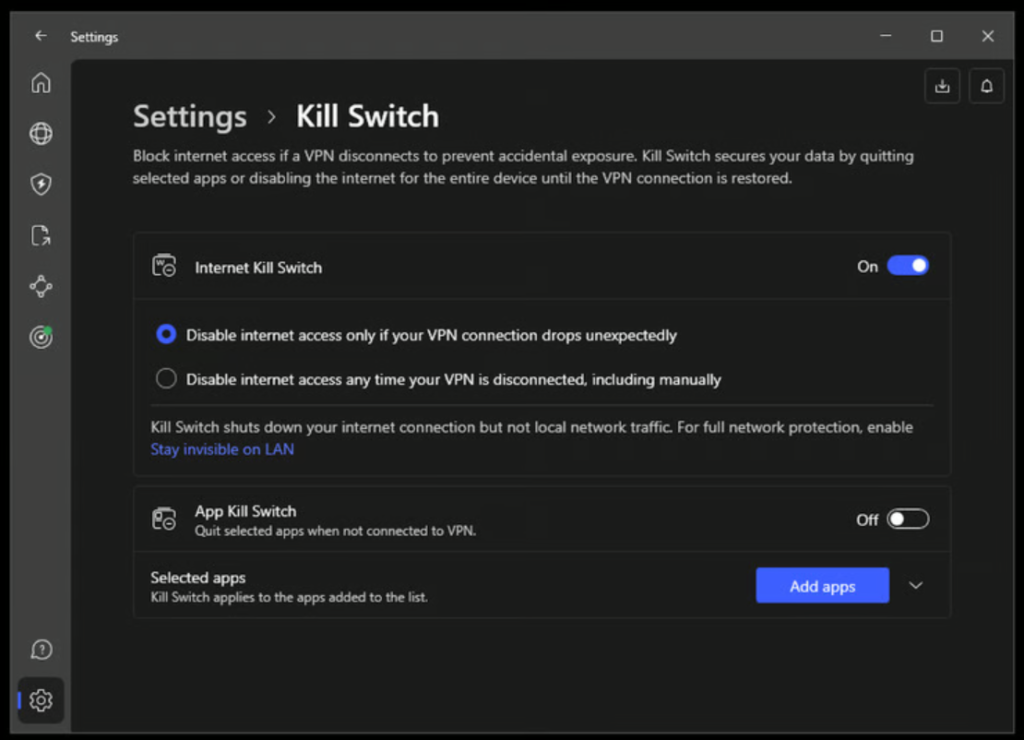
The kill switch is the feature that matters most and gets talked about least. If the VPN connection drops for a moment, the kill switch drops your internet instead of letting your traffic spill onto the open network, so your real IP never leaks during a hiccup. NordVPN has both an app-level switch, which closes only the apps you choose, and a system-wide one that blocks everything until the tunnel is back. I leave the system-wide version on, and on the rare occasion a server has dropped, it has done its job silently.
Leak protection and test results
A VPN is only as good as its weakest leak. NordVPN protects against the three that matter, DNS, IPv6, and WebRTC leaks, and in the leak testing run by the major review labs it comes back clean across all three, which lines up with my own checks every time I have run them. If you want to verify it yourself, connect, then search for a DNS leak test and confirm it shows the VPN’s servers rather than your provider’s. Mine passes cleanly every time. Pair that with the audited no-logs policy below and there is very little surface left for your real identity to slip through.
Split tunneling and obfuscation
Split tunneling lets you send some apps through the VPN and others straight to the internet, which is handy when your bank flags the VPN or you want local traffic to stay local. It is on the Windows and Android apps, and its absence on Mac and iOS is one of my few real gripes. For networks that actively hunt for VPN traffic, NordVPN has obfuscated servers and the NordWhisper protocol, both built to look like ordinary web traffic, which is the kind of thing you only appreciate when you are sitting on a connection that blocks everything else.
Privacy, audits, and the 2018 breach
NordVPN is based in Panama, outside the reach of the intelligence-sharing alliances that make some other jurisdictions a harder sell for privacy. It keeps no activity logs, and that claim has been put in front of outside auditors more than once. Deloitte has examined the no-logs setup repeatedly, most recently in a review that TechRadar covered in 2025, and the servers themselves now run from RAM, so a powered-down machine keeps nothing at all. That detail matters more than it sounds: a server with no hard drive cannot be seized and read after the fact, because there is nothing written down to read.
I raise the audits because of what happened in 2018. One of NordVPN’s rented servers in Finland was breached through a flaw in the data center’s own management system, and the company did not disclose it publicly until TechCrunch reported the confirmation in 2019. The investigation found no user credentials or activity had been exposed, but the slow disclosure was a fair thing to be angry about. What matters to me is the response. NordVPN moved its whole fleet to RAM-only servers, brought in repeated independent audits, and tightened how it vets the data centers it rents from. The incident is the reason I trust the current setup, because a company that has been burned and rebuilt tends to be more careful than one that has never been tested.
For anyone who weighs this heavily, NordVPN sits near the top of my best VPNs for privacy list, just behind the open-source, Swiss-based options. It is the most private VPN I would also call effortless to use, which is a balance very few providers strike. The company also publishes a transparency report covering the legal requests it receives, and because there are no logs, those requests turn up nothing to hand over.
Server network and specialty servers
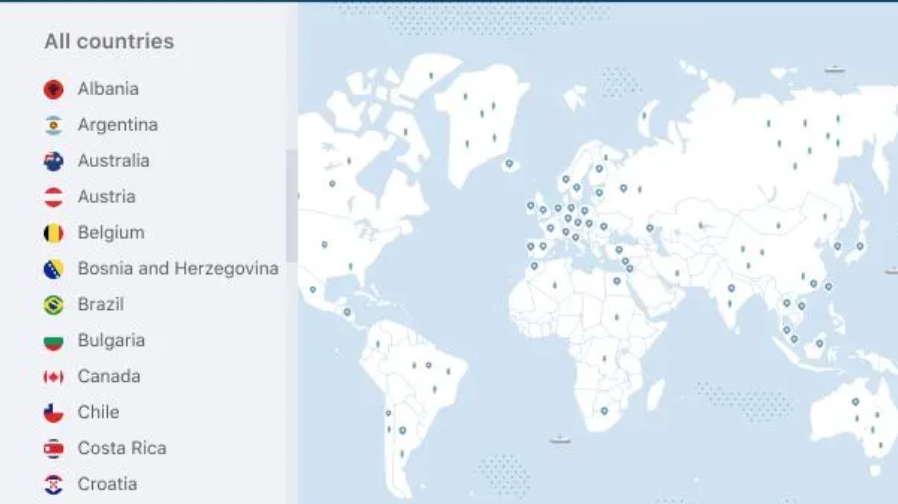
NordVPN says it runs more than 7,200 servers across 110-plus countries, and some independent reviewers count as many as 9,000 to 9,300 across 110 to 130 countries depending on when they checked. The exact figure moves around, but the point holds: in practice that breadth means I can almost always find a fast nearby option and a believable far-away one. Coverage is strongest where you would expect, across the Americas, Europe, and the major Asian hubs, with enough presence elsewhere that I rarely struggle to find a usable server on the move.
Beyond the standard servers, there are specialty ones worth knowing about. Double VPN routes you through two servers for a second layer of cover, which is overkill for most people but reassuring if your threat model is serious. Onion Over VPN sends your traffic into the Tor network without needing the Tor browser. Dedicated P2P servers handle torrents, and the app routes you to them automatically. There is a SOCKS5 proxy for specific apps that support it. And you can buy a dedicated IP if you need a stable address that does not trip the security checks at your bank or workplace, which is the one extra I pay for some years.
Does NordVPN work in China and restrictive countries?
China is the question I get asked most, and the answer is that it usually works but is never guaranteed. NordVPN’s obfuscated servers and the NordWhisper protocol are designed to slip past the kind of deep filtering the Great Firewall uses, and I have had it connect in places with aggressive blocking where other VPNs timed out. The catch is that censorship systems change without warning, so the smart move is to install and test it before you travel, while you can still reach the website to download a working configuration. The same advice applies to other heavily restricted countries: set it up at home, confirm it connects, and carry a backup. For the wider picture, my best VPNs for travel guide covers which providers hold up where.
Streaming with NordVPN
This is the feature I lean on most. Streaming services slice their catalogs by country, and a VPN that cannot keep up with their blocking is useless for it. NordVPN keeps up. From a guesthouse in Chiang Mai with a coffee going cold beside me, I have watched my home Netflix library, switched to a UK server to catch a match on BBC iPlayer, and dropped into US Disney+, without any of them throwing the proxy error that kills lesser VPNs. Its SmartPlay technology handles the routing in the background, so you are not hunting for the one server that still works tonight.
Netflix

Netflix is the toughest test because it actively blocks VPN traffic, and NordVPN gets into more regional libraries than almost anything else I have used. It opens an unusually wide range of regional libraries, well over a dozen, the US, UK, Australia, Japan, Brazil, and France among them. That matches my own experience: when one server gets blocked, another in the same country almost always works. If your main reason for buying is watching a specific country’s Netflix from abroad, this is one of the safest picks there is.
BBC iPlayer, Disney+, and the rest

BBC iPlayer is notoriously strict, and NordVPN has worked for me on UK servers more often than not, which is better than most can claim. Disney+ loads cleanly across the regions I have tried, including the US and UK catalogs. Hulu and HBO’s Max, both aggressive about blocking VPNs, have been reliable on US servers in my use. Amazon Prime Video adapts to whichever region your server sits in, so you get that country’s catalog rather than an error screen. ITV and Channel 4 round out the British services I reach for when I want live UK television from abroad. The one rule that always applies: if a service will not load, switch servers within the same country before assuming it is broken, because it is nearly always the individual server, not the VPN.
Smart TVs and consoles
For devices that cannot run the app directly, like some smart TVs and games consoles, NordVPN’s SmartDNS feature handles the geo-switching instead. It does not encrypt your traffic, so it is a convenience tool rather than a privacy one, but for getting a hotel-room TV onto the right Netflix it is exactly what you want. There are also native apps for Android TV and Fire TV, which I cover below. NordVPN sits at the top of my best VPNs for streaming guide for exactly these reasons.
Torrenting and P2P
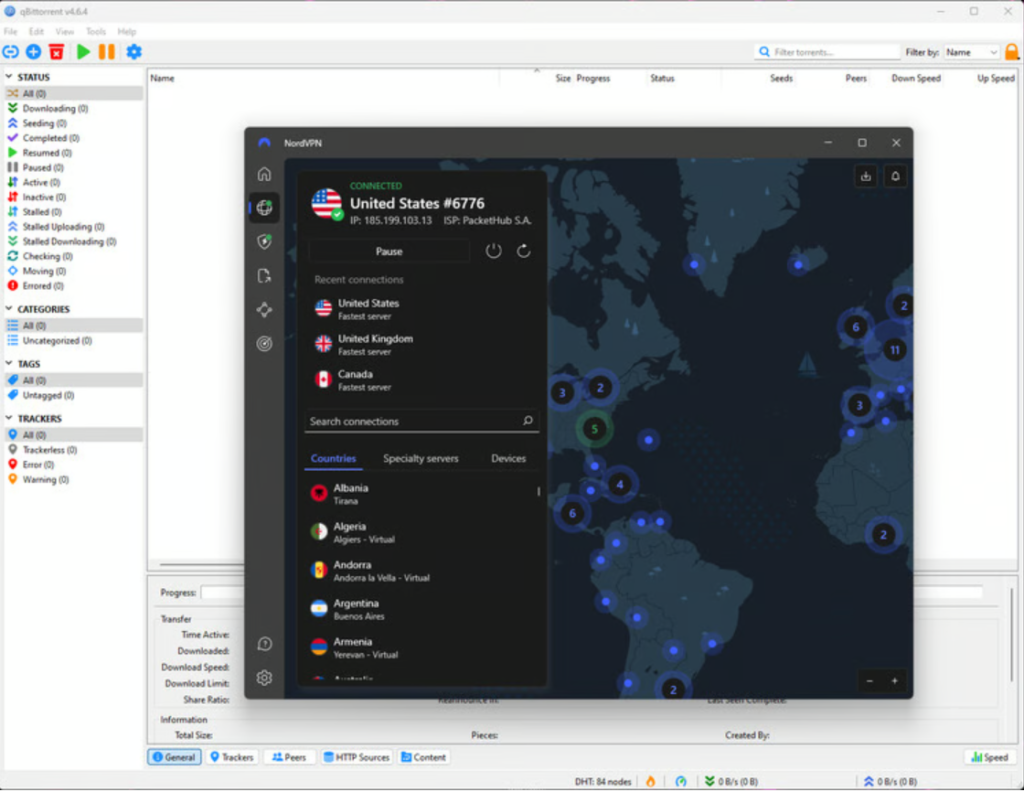
P2P traffic is allowed on dedicated servers, and the app routes you to them automatically when it sees torrent activity. The kill switch cuts your connection the instant the tunnel drops, so your real IP does not leak into the swarm between reconnects. I have left long downloads running overnight on it without a babysitter. There is also a SOCKS5 proxy option for clients that support it, and Meshnet, which I will get to, makes moving large files between your own devices straightforward.
One limitation: NordVPN does not offer port forwarding, which a small group of torrenting power users rely on to connect to more peers and squeeze out faster speeds. If that is essential to you, Private Internet Access and ProtonVPN both support it, and I note them in my best VPNs for torrenting list. For everyone else, the combination of allowed P2P, a dependable kill switch, fast speeds, and the Panama base is exactly the right shape, and NordVPN ranks at the top of that list.
Gaming
I am not a competitive gamer, but I play enough to notice lag, and NordLynx keeps latency low enough on nearby servers that online matches feel normal. The latency hit is small where it counts: on a nearby server the ping barely moves, climbing from a 10ms baseline to around 13ms, and it sits near 89ms to a European server from outside the region, which is still fine for most online games. A VPN will never make your ping better than a direct connection, but it can help with two specific problems: dodging the bandwidth throttling some internet providers apply to game traffic, and connecting to servers in other regions to play with friends abroad or reach a game that launched somewhere else first. Meshnet also makes it trivial to set up a private network with people you trust, which is a tidy way to run an old-school LAN session over the internet.
The apps, platform by platform
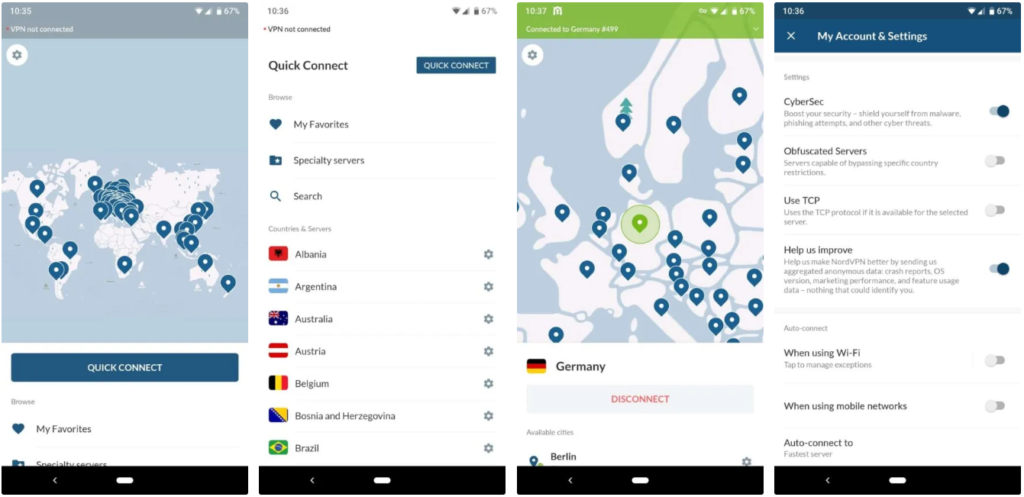
The apps stay clean and consistent across platforms, with a map you can click and a search box if you would rather just type a country. Here is how each one feels in daily use.
- Windows is the most complete app, with split tunneling, the full Threat Protection suite, and every server type a click away.
- macOS is nearly as good, though it loses split tunneling, which remains my main complaint on Apple’s platforms.
- iOS and Android are clean and quick, connect in a tap, and offer auto-connect on untrusted networks, the setting I value most on a phone.
- Linux has a capable app, command-line friendly, which is more than many providers bother to offer.
- Browser extensions for Chrome, Firefox, and Edge cover quick, lightweight protection in the browser.
- Android TV and Fire TV apps put the living room within reach without needing a router setup.
Setup takes a couple of minutes on any of them, and if you have never done it before, my guide to setting up a VPN walks through it. The consistency across platforms is underrated: once you learn the app on one device, you know it everywhere. The mobile apps in particular have grown up over the past couple of years, and the auto-connect rule that fires the moment you join an unknown network is the single feature I would not give up on a phone.
One more thing about the apps that is easy to miss: they look and behave the same everywhere, so the muscle memory carries over. The map, the Quick Connect button, the settings layout, all of it transfers from your laptop to your phone to the television. For a household where different people use different devices, that consistency means one person can help another without relearning anything. It sounds minor until you are talking a relative through a setting over the phone and realize you are both looking at the same screen.
Extra features worth using
Plenty of VPNs pad their feature lists with things you will never open. NordVPN’s extras are mostly ones I use. Threat Protection Pro blocks ads, trackers, and known malware domains at the network level and scans your downloads, and it is good enough that I leave it on full time, even when I am not connected to a server. Meshnet lets you link your own devices into a private encrypted network, which sounds niche until the afternoon you need to reach your home machine from a hotel three time zones away.
Dark Web Monitor watches for your credentials turning up in known data breaches and warns you, which has flagged an old password of mine before. The higher plans add more: a password manager in the Plus tier, and encrypted cloud storage in the Complete tier for people who want their whole security kit under one subscription. None of it is buried under settings menus, which counts for more than the feature list suggests. If you only ever touch the connect button, you lose nothing; if you want the deeper tools, they are there.
Five ways I use NordVPN
Feature lists are abstract, so here is what the thing does in my week. On airport and hotel WiFi, I leave auto-connect on and never think about whether the network is safe, because the encryption makes that question moot. When I want my home country’s Netflix or a match on a UK channel from abroad, I tap a server in the right country and SmartPlay handles the rest. When I download large files over P2P, I use the dedicated torrenting servers and trust the kill switch to keep my real address out of the swarm. When my bank gets suspicious about logging in from a new place, the dedicated IP gives me a stable address it recognizes. And when I need a file off my home computer while I am on the other side of the world, Meshnet links the two machines as if they were on the same network. None of these are demos I set up to test the app. They are the ordinary reasons it stays installed.
Reliability and connection stability
A VPN you cannot trust to stay connected is worse than none, because it lulls you into a false sense of cover. NordVPN has been steady for me across years and continents. Reconnections after my laptop wakes from sleep are quick, the app reconnects on its own when a network blips, and I rarely see the dropped-tunnel moments that plague cheaper services. On mobile, the auto-connect feature re-establishes protection the instant I rejoin a known-bad network. Stability is unglamorous and easy to overlook in a feature list, but it is one of the reasons I keep paying for this one.
Troubleshooting common NordVPN issues
Most problems people hit with NordVPN have a quick fix. Here are the ones I have run into and how I solve them.
If a streaming service will not load, the culprit is almost always the specific server, not the VPN, so switch to a different server in the same country and try again; one will usually work where another is blocked. Clearing your browser cache and cookies helps too, since they can carry your real location. If the connection is slow, change to a nearby server, make sure NordLynx is the active protocol rather than OpenVPN, and avoid the busiest locations at peak hours. If NordVPN will not connect at all on a restrictive network, switch on the obfuscated servers or the NordWhisper protocol, which are built to get through firewalls that block standard VPN traffic. If an app or website misbehaves only while the VPN is on, split tunneling on Windows or Android lets you route that one app outside the tunnel. And if your bank or a shopping site keeps challenging you, a dedicated IP stops you looking like a different stranger every time you log in. When none of that works, the 24/7 live chat has sorted out my stranger problems quickly.
Ease of use and customer support
For all its depth, NordVPN is easy to live with. The defaults are sensible, Quick Connect does the thinking, and the features that need explaining have a short note attached. A first-time user can install it and be protected in two minutes without reading anything, and a power user can dig into protocols, split tunneling, and specialty servers when they want to. That range is hard to pull off, and it is a big part of why this is the VPN I recommend most often.
NordVPN keeps live chat staffed around the clock, and it is the good kind. The few times I have needed it, usually some self-inflicted problem with a router setup, I reached a human who knew the product and fixed it without making me restart my computer three times first. There is also a thorough help center full of step-by-step guides and email support for the slower-burning questions. Support is easy to overlook until the night before a flight when nothing will connect, and this is the kind you want in that moment.
One concrete example sticks with me. I once locked myself out of my own router after a botched attempt to set up the VPN on it in a rental apartment, at an hour when nothing good happens. The live chat agent walked me through resetting the configuration step by step, stayed with me until it connected, and never once implied I had broken it myself, even though I plainly had. That is the difference between support that exists and support that helps, and it is worth more than any single feature on the spec sheet.
NordVPN for families and shared use
Ten simultaneous connections is enough for most households, covering everyone’s phones and laptops plus a TV or two. If your family runs more devices than that, you have two options: install NordVPN on your router, which protects everything on the network while counting as a single device, or look at a provider with unlimited connections like Surfshark. For a typical family of three or four, though, ten slots and the easy apps make NordVPN a sensible shared subscription, and the password manager on the higher tiers is a bonus for a household trying to get its logins under control.
Setting up NordVPN
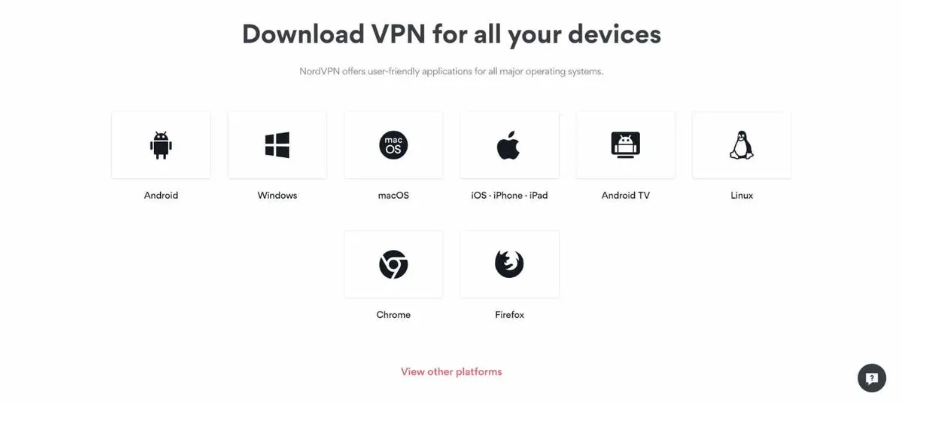
Getting started takes about three minutes. Sign up on the website, download the app for your device from the official source, sign in, and tap Quick Connect. That alone is enough to be protected. If you want to tune it, three settings are worth a look: turn on the system-wide kill switch, set the protocol to NordLynx for speed, and on a phone switch on auto-connect for untrusted networks so it covers you the moment you join public WiFi. For a smart TV or console that cannot run the app, either install NordVPN on your router to cover the whole house at once, or use the SmartDNS feature for streaming. My full setup guide walks through every platform if you want the detailed version, though most people never need it.
What is new for 2026
NordVPN has not stood still. The headline addition is NordWhisper, a protocol built to disguise VPN traffic and get through networks that block standard connections, which matters most for travelers heading somewhere with heavy censorship. The server network has kept growing, post-quantum encryption support has been rolling out to harden the tunnel against future threats, and Threat Protection Pro has widened what it blocks and scans. Meshnet and Dark Web Monitor have both been refined. None of this changes the core experience, which stays tap-and-go, but it is the kind of steady investment that tells you the company is not coasting on its reputation.
NordVPN pricing and plans
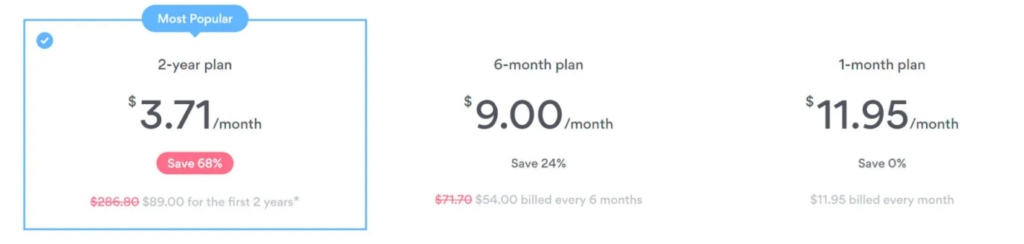
The price is reasonable if you commit to a long plan and steep if you do not. The two-year plan lands at roughly $3.09 a month, while the monthly plan costs several times that, which is the usual VPN math. Nord splits its plans into Basic, Plus, and Complete tiers. Basic is the VPN on its own. Plus adds the full Threat Protection suite and a password manager. Complete adds encrypted cloud storage on top. For most people the middle tier is the sweet spot, because Threat Protection Pro is the extra most worth having.
| Plan | What you get | Roughly |
|---|---|---|
| Basic | VPN, Threat Protection, 10 devices | From ~$3.09/mo (2-year) |
| Plus | Basic + Threat Protection Pro + password manager | A little more |
| Complete | Plus + 1TB encrypted cloud storage | More again |
| Monthly | Same features, no commitment | Several times the 2-year rate |
You can pay by card, PayPal, Google Pay, or cryptocurrency if you would rather not tie the subscription to your name. Every plan comes with the same 30-day money-back guarantee, so the long commitment carries little risk: subscribe, use it hard for a few weeks, and get a refund if it does not fit your life. One caveat worth knowing is that purchases made through the Apple App Store can be harder to refund than ones made directly on NordVPN’s site, so buy from the website if you want the cleanest guarantee. Prices also climb at renewal after the first term, which is true across the whole industry, so set a reminder before it does. Even at the renewal rate, it stays competitive with the other premium names for what it includes.
Is it worth the money? Set against the budget providers, NordVPN costs a little more, and Surfshark will undercut it every time. Set against the other premium names, it is fairly priced for a deeper feature set, and on the two-year plan it works out to less than most people spend on coffee in a week. The value question really comes down to commitment: on a long plan it is a genuine bargain for what it does, and on the monthly plan it is hard to justify against the alternatives. Pick the long term, or do not bother.
30-day money-back guarantee on every plan.
How NordVPN compares
The two questions I hear most are how it stacks up against the other premium name and against the value champion. ExpressVPN is the closest rival on polish and speed, and the choice between them is genuinely close, which I break down in NordVPN vs ExpressVPN. Surfshark comes at the problem from the budget end with unlimited devices, and it shares a parent company with Nord now, which makes the comparison more interesting than it used to be. I put them side by side in NordVPN vs Surfshark. If streaming on a budget is the goal, CyberGhost is worth a look in NordVPN vs CyberGhost, and if hard privacy is your single priority, ProtonVPN and its Swiss base are the other name to weigh.
NordVPN alternatives worth considering
No single VPN is right for everyone, and NordVPN has three main rivals I would point you to depending on what you value. ExpressVPN is the pick if a flawless, fuss-free app matters more to you than features or price; it is just as fast and private, and a little easier, for a little more money. Surfshark is the value champion, covering unlimited devices for roughly a third of the cost, with most of the same capability and only a small drop in long-distance speed. ProtonVPN is the choice for privacy purists, with Swiss jurisdiction, open-source apps, and a genuinely trustworthy free tier. Each beats NordVPN on one specific axis. None beats it on the combination of all of them, which is the whole reason it stays my default. You can see the full field in my best VPNs of 2026.
NordVPN vs a free VPN
People sometimes ask whether they can skip the subscription and use a free VPN instead. For occasional, light use there is one free option I trust, ProtonVPN’s free tier, and I would send you there before any other. But for what NordVPN does, fast speeds on every device, reliable streaming across regions, a large server network, audited privacy, and round-the-clock support, the free apps are not in the same conversation. Most of them make their money by logging and selling the very traffic you installed them to protect, which defeats the entire point. I lay out the full case in my free versus paid VPN guide. The short version: a few dollars a month buys a genuinely private, genuinely fast connection, and free almost never does.
NordVPN FAQ
Is NordVPN safe to use?
Yes. It encrypts your traffic with current standards, keeps no activity logs, and runs its servers from RAM, and that no-logs claim has been verified by independent auditors more than once. The 2018 server breach was real, but it exposed no user data and led to the hardened setup the service runs today.
Does NordVPN keep logs?
No. NordVPN’s no-logs policy means it does not record what you do online, and Deloitte has repeatedly audited that claim. Its Panama base sits beyond the major surveillance alliances, so there is no legal pressure to retain data in the first place.
Does NordVPN work with Netflix?
Yes, and reliably. Independent testing has it opening 12 or more regional Netflix libraries, including the US, UK, Australia, Japan, and more, plus BBC iPlayer, Disney+, Hulu, and Amazon Prime Video. For smart TVs and consoles that cannot run the app, the SmartDNS feature does the geo-switching.
How many devices can I use NordVPN on?
Up to 10 devices at the same time on one account, which covers a typical household. If you need to protect an unlimited number of devices, Surfshark is the provider built for that, or you can run NordVPN on your router to cover everything as a single connection.
Does NordVPN work in China?
Usually, but never with a guarantee. Its obfuscated servers and NordWhisper protocol are built to get past heavy censorship, and they have a good track record. Set it up and test it before you travel, since the blocking changes without warning.
Is NordVPN good for torrenting?
Yes. It allows P2P on dedicated servers, routes you to them automatically, and protects your real IP with a reliable kill switch from its Panama base. The only gap is the lack of port forwarding, which a few power users will miss.
Is there a free version of NordVPN?
No, NordVPN does not have a free tier. It does offer a 30-day money-back guarantee, so you can use it fully and get a refund if it is not for you. If you specifically want a free VPN you can trust, ProtonVPN’s free plan is the one I recommend.
Can I use NordVPN on my router?
Yes. Installing NordVPN on a compatible router protects every device on your home network at once and counts as a single connection. The company publishes setup guides for the popular router brands, and my own setup guide covers the basics.
What is Meshnet?
Meshnet is a free NordVPN feature that links your own devices into a private encrypted network, so you can reach your home computer from the road, share files securely, or set up a private gaming session. It is included even on the basic plan and is one of the more genuinely useful extras.
How do I cancel NordVPN and get a refund?
Contact support through the 24/7 live chat within 30 days of your purchase and request a refund under the money-back guarantee. For the smoothest process, buy directly from NordVPN’s website rather than through the Apple App Store, where refunds follow Apple’s rules instead.
Does NordVPN slow down your internet?
A little, the way any VPN does, but with NordLynx on a nearby server the drop is small enough to ignore for streaming, calls, and browsing. In some cases it can even speed you up by routing around an internet provider that was throttling your traffic. My guide on whether a VPN slows your internet goes into the details.
Is it legal to use NordVPN?
In the vast majority of countries, yes, using a VPN is completely legal. A handful of governments restrict or ban them, so check the local rules if you are traveling somewhere with heavy internet controls. My guide on whether VPNs are legal covers where the exceptions are.
Can I use NordVPN on all my devices at once?
You get 10 simultaneous connections per account, which covers a typical household. If you need more, install NordVPN on your router, where it protects every device on the network while counting as a single connection.
What is NordLynx?
NordLynx is NordVPN’s own protocol, built on top of WireGuard. It is what makes the service so fast while keeping the connection secure, and it is the default in the apps, so you benefit from it without changing a thing.
Is NordVPN a Russian company?
No. This is a common myth. NordVPN was founded by Lithuanian school friends, its parent Nord Security is based in Lithuania, and the VPN service is registered in Panama. There is no Russian ownership or jurisdiction involved.
Does NordVPN work on a Firestick?
Yes. There is a native app for Amazon Fire TV and Fire Stick, as well as Android TV, so you can install it straight onto the device. For other TVs that cannot run the app, use SmartDNS or run NordVPN on your router.
Can NordVPN be hacked?
No system is perfectly immune, but NordVPN is among the most hardened consumer VPNs. The 2018 server breach exposed no user data, and the response, RAM-only servers and repeated independent audits, makes the current setup considerably harder to compromise than most.
Does NordVPN hide my IP address?
Yes. It replaces your real IP address with the address of the server you connect to and encrypts your traffic, so websites and your internet provider see the VPN rather than you.
Is NordVPN good for online banking?
Yes, especially on public WiFi, where the encryption protects your login from anyone else on the network. If your bank flags logins from new locations, a dedicated IP gives you a stable address it learns to recognize.
How much does NordVPN cost?
About $3.09 a month on the two-year plan, with the monthly plan costing several times that. The Basic, Plus, and Complete tiers add features like the full Threat Protection suite, a password manager, and cloud storage. Every plan has a 30-day money-back guarantee.
Is NordVPN better than ExpressVPN?
For most people, yes, on the balance of features and value, though the two are close and ExpressVPN edges it on app simplicity. I weigh them point by point in my NordVPN vs ExpressVPN comparison.
Will NordVPN work with my smart TV?
Yes. Android TV and Fire TV devices can run the app directly. For other smart TVs that cannot, use the SmartDNS feature for streaming or install NordVPN on your router so the TV is covered through the network.
Does NordVPN include antivirus?
Threat Protection Pro, included on the Plus and Complete tiers, blocks malware domains and scans your downloads for threats, which covers much of what antivirus does at the network level. It complements a dedicated antivirus rather than fully replacing one.
Does NordVPN make me completely anonymous?
No VPN makes you completely anonymous, and NordVPN does not claim to. It hides your IP address and encrypts your traffic, which is a major privacy upgrade, but your accounts, browser, and habits still identify you. For the strongest anonymity, pair it with careful browsing and the Tor network.
Is NordVPN worth it in 2026?
For most people, yes. On the two-year plan the price is fair for what you get, and no other provider I have used handles privacy, streaming, and torrenting this well at once. With the 30-day guarantee, trying it costs you nothing if it turns out not to fit.
Where NordVPN frustrates me
No review is honest without the gripes, so here are mine after years of daily use. The renewal price is the big one: the first term is a genuine bargain, and the rate climbs noticeably once it ends, so I keep a reminder to reassess before it does. Split tunneling still has not reached the Mac and iOS apps, which is baffling on a service this polished, and it is the feature I miss most the moment I pick up my phone. There is no port forwarding, so the most demanding torrenters will want a different provider. And every so often a large app update resets a setting, so I give the preferences a glance after one lands. None of these are dealbreakers, or it would not still be on my devices, but a review that pretends a product is flawless is not worth the time it takes to read.
Verdict: who should buy NordVPN
If you want one VPN that handles privacy, streaming, and torrenting without making you think about which is which, this is the one to buy. It is the default I recommend and the one I personally keep installed. Two groups might look elsewhere. If budget is the deciding factor and you want unlimited devices, Surfshark does more for less. If absolute, audit-everything privacy is your single priority, a Swiss provider like ProtonVPN will scratch that itch harder. For everyone in the wide middle, which is most of us, NordVPN is still the safest call in 2026.
A practical note before the final word. The price only makes sense on a long plan, so commit to the two years or skip it, and set a calendar reminder before the renewal, because that is where the rate jumps. Switch on the kill switch and, on mobile, auto-connect, leave the protocol on NordLynx, and then stop thinking about it. Everything else just works, which after years of leaning on VPNs in every corner of the world is rarer than it should be.
This is the one I would pay for, and the one I have paid for. Grab it on the two-year plan, give it a couple of weeks of real use, and keep it if it earns its place. Mine has, for years.
30-day money-back guarantee, cancel anytime.
Leave a Reply
You must be logged in to post a comment.