

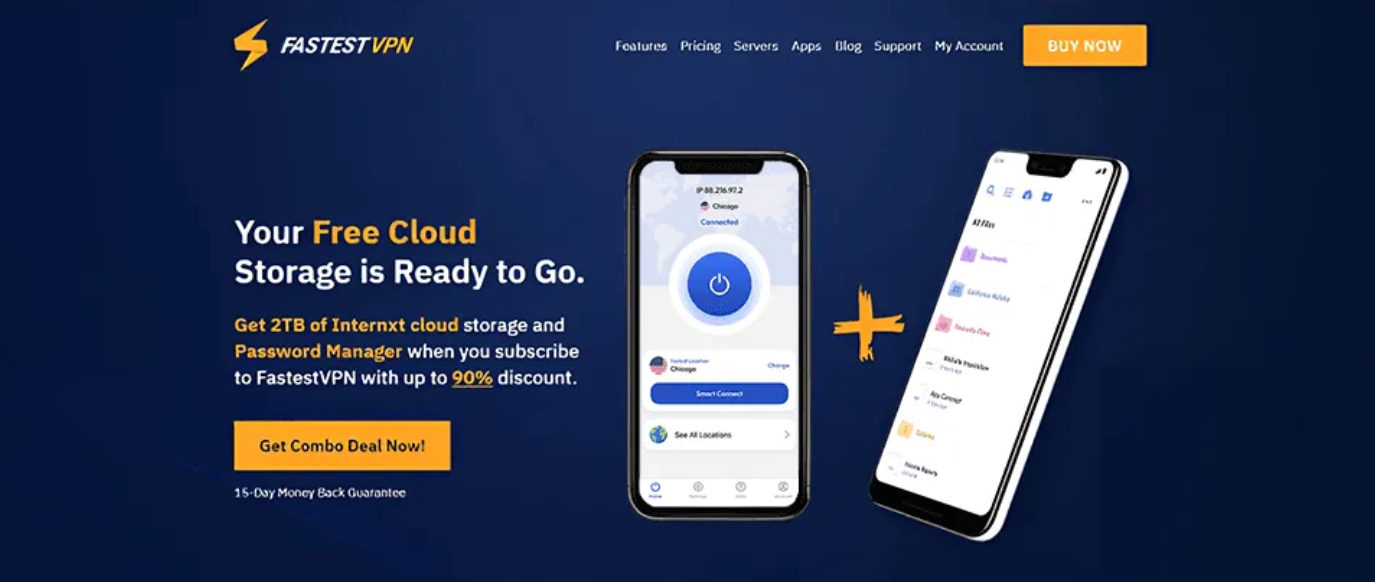
Calling a VPN FastestVPN is a dare, and the first thing anyone does is take it: install the thing, run a speed test, and see whether the name survives contact with reality. It does not, and after a couple of years of keeping it on a travel phone and a spare laptop I am not going to pretend it does. So why has it kept a place on my list? One number, really. The lifetime plan costs around $40 once, and then it never asks you for money again, which almost nothing else in this market will do. For the right buyer, that one figure outweighs everything the name oversells. My rating: 4.0 out of 5.
Here is the verdict before any of the detail. FastestVPN is a budget, set-it-and-leave-it VPN that sells a price model, not a speed crown. If you want a secure connection for everyday browsing and streaming, you would rather not watch a subscription leave your account every month, and you understand you are buying value instead of a podium finish, the lifetime deal is a genuinely shrewd purchase. If you need the best long-haul speeds, a sprawling server network, or something that works behind China’s firewall, this is the wrong tool, and I will say where to go instead before the end./tab
15-day money-back guarantee.
Table of Contents
FastestVPN at a glance
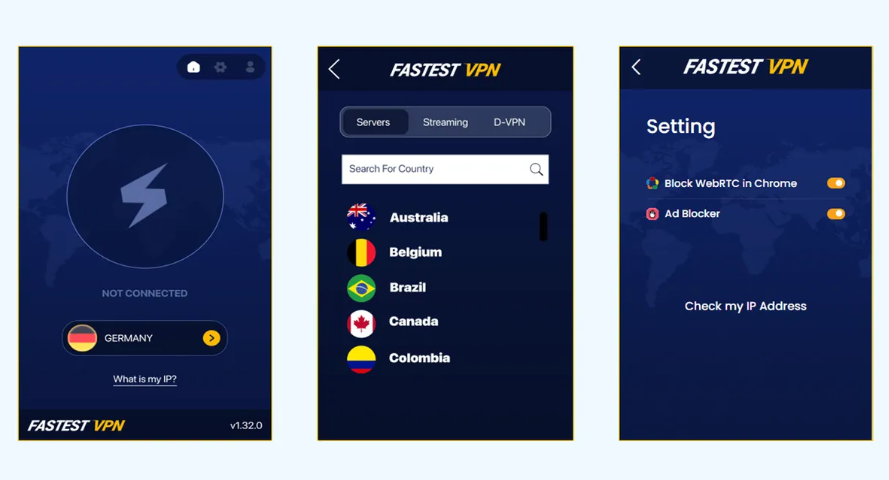
FastestVPN has been around since 2016, run out of the Cayman Islands, and over those years it has filled out from a bare-bones budget tool into something a bit more complete, without ever losing the sense that the price is the reason it exists. Before the deep dive, the balance sheet of where it delivers and where it asks you to lower the bar.
What it gets right:
- A real lifetime plan for one payment of about $40, frequently packaged with 2TB of cloud storage and no bill ever again.
- A Cayman Islands home that sits outside the Five, Nine, and 14 Eyes alliances and carries no data-retention law.
- Streaming that reaches more services than a budget tool has any business reaching.
- Coverage for 10 devices at once, with ad-blocking and a NAT firewall baked into every server.
- Plain apps you can configure once and then ignore for good.
What I would change:
- The name oversells. It is not the quickest VPN I have run, and the gap is not close.
- The network is small, and outside counts put it well below the company’s own headline figure.
- The no-logs policy leans on a single audit rather than the repeat checks the big names publish.
- A 15-day refund window, shorter than almost anyone else gives you.
- It does not work in China, and the company effectively admits it.
The lifetime deal is the whole pitch
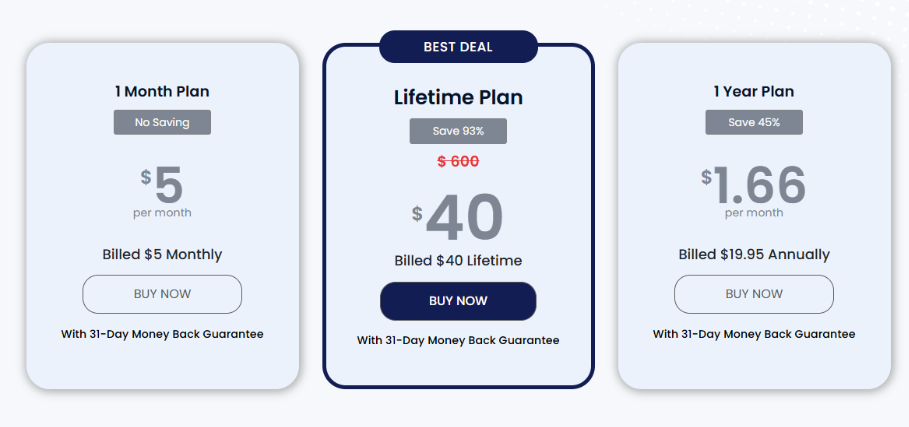
The one thing that lifts FastestVPN out of the crowd of cheap providers is the way it charges. Nearly every VPN worth buying takes a few dollars a month, forever, with a rate that creeps up the moment your introductory term lapses. FastestVPN sells a lifetime plan instead. You pay roughly $40 one time, often with 2TB of cloud storage thrown in, and that is the last thing its billing system ever says to you. No renewals, no annual charge on a card you forgot you saved.
Run the arithmetic and the appeal is obvious. A premium provider such as NordVPN costs somewhere around $3 to $4 a month on a long plan, which is fair for what it does, but three years of that clears $100 and five years is real money. FastestVPN’s lifetime price comes in under a single year of most premium names. If your needs are modest and you plan to keep a VPN installed for the long haul, paying once and forgetting it is a legitimately good deal rather than a trick wearing a deal’s clothing.
The catch, and lifetime VPN deals always carry one, is that you are placing a bet on the company. A monthly subscription is a string of small, cancellable choices. A lifetime plan is a single wager that the provider stays solvent, keeps the apps current, and does not let the service decay once your money has cleared. FastestVPN has been trading since 2016, which takes some of the risk out of that wager, but it is still a wager, and you should make it knowing exactly what it is. One more thing worth flagging, raised by other reviewers and matching my own fumbling around the site: the lifetime offer can be weirdly hard to find, and the headline price shifts with whatever promotion happens to be live, so you may have to dig for it or ask support to surface the current version.
Speed in real-world use
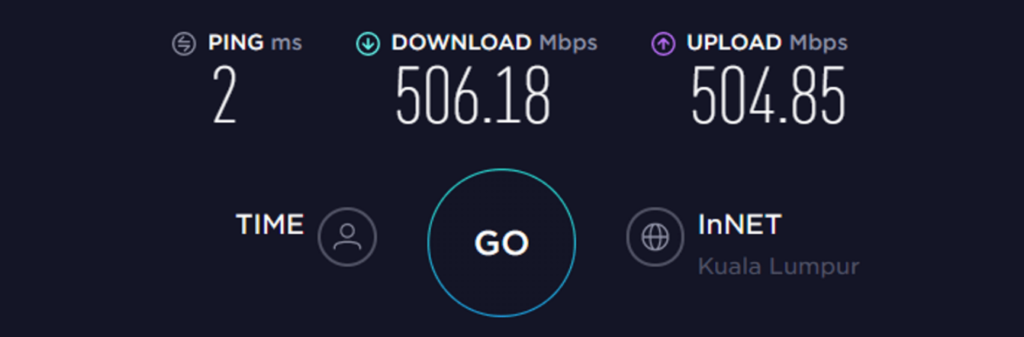
The name promises everything. Reality is more measured, and more useful to know. On a nearby server FastestVPN is fine. Browsing, HD video, calls, the ordinary traffic of a working day all pass through without the connection drawing attention to itself, and on a healthy home line you will forget it is on. For most people, most days, that is the only speed question that counts.
The strain shows over distance. Reach across an ocean and FastestVPN gives up more speed than the premium providers do on the same route, and because the network is small, the busy locations can clog at peak hours and slow further still. The independent numbers tell the story plainly. In testing, a roughly 42 Mbps line held about 32 Mbps through the VPN, near three-quarters of the original, while a faster 67 Mbps connection fell to around 38, closer to half. On one throttled line the VPN actually came out slightly ahead of the unprotected speed, because it sidestepped an internet provider that had been throttling the line in the first place. That is the real shape of it: capable up close, thinner the farther you stretch, with the occasional pleasant surprise on a throttled connection.
My own experience matches the chart. Working from a guesthouse in northern Thailand, I have watched a download crawl on a FastestVPN server in the United States, swapped to a faster provider on the same WiFi, and seen it climb right away. Latency tells the same gentle story: close to home the ping barely moves, which keeps calls and casual gaming comfortable, but the cushion thins on long routes. None of this is damning for the audience this VPN is built for. If your online life mostly happens near home, the speed is a non-issue; if you routinely haul traffic between continents, you will feel the drag, and I weigh it against the other budget heavyweight in my Surfshark vs FastestVPN comparison.
Who FastestVPN is for
It helps to be concrete about the buyer this suits, because FastestVPN is a sharper recommendation for some people than for others. There is the set-and-forget user who wants protection on public WiFi and never plans to open the app again after the first connection. Cord-cutters fit too, the ones who mostly watch geo-locked catalogs from the couch and care more about whether Netflix loads than about raw throughput. If you are worn down by every service nibbling at your card each month, the finality of paying once will pull at you harder than any feature could. And a cheap, dependable VPN on a travel phone or a kid’s tablet beats stretching a premium subscription across yet another device it was never meant to cover.
To make it tangible, picture the person I most often hand it to. A friend setting off on a long stint abroad who wants their home Netflix and BBC iPlayer to follow them, does not want a monthly charge ticking over on a card while they are away, and will not fuss over server menus. They pay the one-time fee before they fly, install it on a phone and a laptop, and that is the last admin the VPN ever asks of them. For that buyer the value is real and the compromises never surface, because the things FastestVPN does poorly are things they were never going to do anyway.
The person it does not suit is just as clear. If you live on intercontinental connections, need a server in some obscure country, want a no-logs policy checked to the hilt, or have to get online inside heavy censorship, FastestVPN will frustrate you, and you should pay a little more for a tool built to handle it. Knowing which of those two users you are makes this an easy yes or an easy no, with not much grey area between.
Streaming and gaming
Streaming is the genuine bright spot, and it overdelivers for the money. FastestVPN added a streaming tab that steers you to the servers tuned for the job, and across its network it has handled the services I watch. Netflix is the hard test, since it works overtime to spot and block VPN traffic, and FastestVPN gets into several regional libraries rather than only the US one. Testing pulled up full Netflix catalogs from the US, the UK, Japan, and Sweden, with some picture wobble on the US library, which lines up with the odd dip to standard definition I have seen on a busy night.
The rest of the lineup holds. Disney+ played for me, though reviewers note you may have to switch browsers to coax it open, and Hulu, HBO’s Max, Amazon Prime Video, and BBC iPlayer have all come through on the right servers. For a budget VPN to clear that many gatekeepers genuinely surprised me when I first set it up, and it is the main reason FastestVPN earns a place on my best VPNs for streaming list for buyers on a tight budget. If a service throws up an error, the fix is almost always to hop to another server in the same country rather than give up; a blocked library is usually one bad server, not the whole VPN.
Gaming is the softer story. On a close server with a decent base connection, online matches feel normal and the latency penalty stays small enough for casual play. It is not tuned for gaming, the lean network limits your choices, and lag piles up over distance, so anyone competitive should look past it. But for the buyer who wants one cheap tool that also unlocks foreign catalogs from the sofa, FastestVPN does the watching far better than it does anything else.
Security, encryption, and leak protection
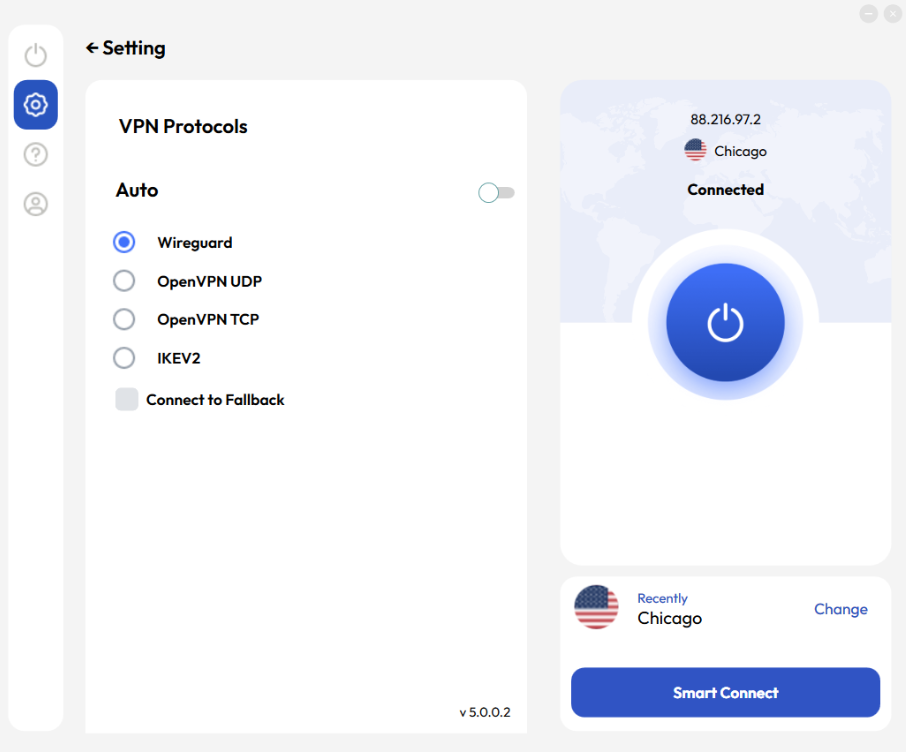
This is where FastestVPN beats its reputation, because the security groundwork is all here and configured sensibly from the first launch. Your traffic rides on AES-256, the same cipher the serious providers use and the same one guarding online banking. The protocol menu covers the three that matter, with WireGuard for the best mix of speed and security, OpenVPN for the most thoroughly vetted option, and IKEv2 for holding a mobile connection as you move. You never have to pick, since the defaults are right, but the choice is there for anyone who enjoys tinkering.
Wrapped around that core are the protections that keep your identity from spilling. The kill switch severs your internet the moment the tunnel falters, so your real address never escapes onto the open network during a stumble, and on the macOS app it runs on by default with no toggle to turn it off, which I read as a feature rather than a missing option. Every FastestVPN server also carries a built-in NAT firewall that turns away unsolicited inbound traffic, the sort of extra most budget tools skip. There is an ad and tracker blocker, and split tunneling to route chosen apps outside the VPN, though that last one lives only on the Android app, the same trade plenty of providers make.
What matters most is whether any of this leaks, and the testing is reassuring. The weak points to worry about are the small gaps where a DNS request or your true address can slip out around the encrypted tunnel. I ran FastestVPN through both the DNS and WebRTC leak tests and found it clean on each, which matches what I see when I check it myself. If you want to confirm your own setup, connect and load any reputable leak-test page, then make sure the address and DNS shown belong to FastestVPN rather than to you. Mine has come back clean, and that is the floor you should demand from anything you trust with your traffic.
Privacy, jurisdiction, and the audit question
FastestVPN’s privacy case opens with geography, and it is a strong opening. The company sits in the Cayman Islands, a jurisdiction with no mandatory data-retention law and no membership in the Five, Nine, or 14 Eyes intelligence-sharing groups. In plain terms, no government is positioned to force it to stockpile your records, and no alliance is owed a feed of them. For a privacy tool, the address on the incorporation papers is not a footnote, and this is a genuinely favorable one.
It runs a no-logs policy, keeping only what it needs to sign you in and bill you and holding nothing about where you go online. The harder question is whether you have to take that purely on trust, and here FastestVPN occupies an interesting middle ground. It is not in the company of NordVPN, Surfshark, or ProtonVPN, which march their no-logs claims past big-name auditors again and again and publish the findings. But it is not flying entirely unchecked either: its no-logs setup has been examined in a third-party audit by Altius IT, which is more outside verification than a lot of budget providers can show. My read is that this is a reasonable place for a value tool to stand, sturdier than a bare promise and softer than the gold standard, and exactly the nuance you want in hand before you buy rather than after.
If provable, audit-everything privacy is the single thing you weigh above all else, FastestVPN is not where I would send you, and I say as much in my best VPNs for privacy guide. For the far more common buyer who wants solid, everyday privacy on hotel and café WiFi without paying premium rates for it, the Cayman base and the audited policy make a sound foundation to build on.
Server network and restrictive countries
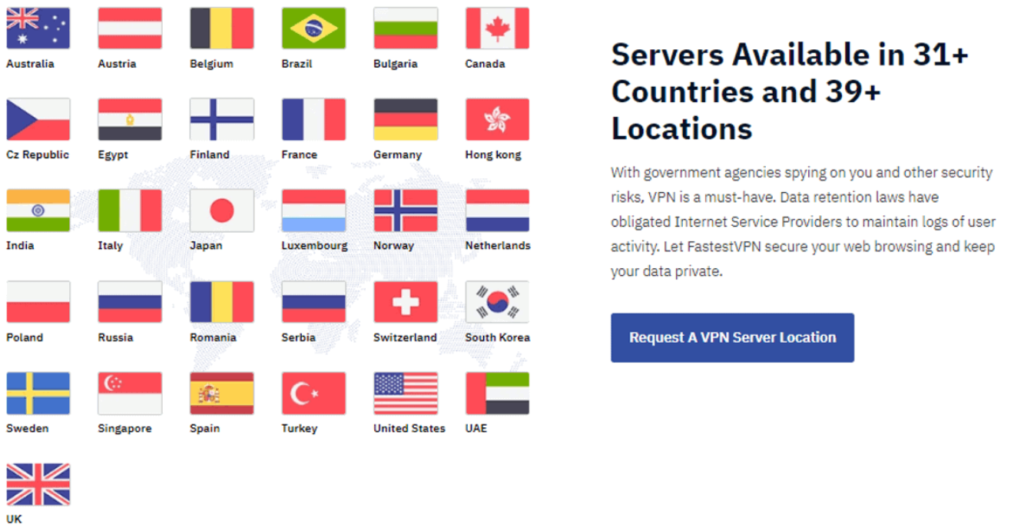
Here the budget shows its hand. FastestVPN advertises more than 800 servers across roughly 49 countries, which is the figure on its own marketing. Independent counts land lower, closer to 250 servers in about 30 countries, and either way the takeaway is the same. This is a small network next to the big providers, which run thousands of servers across a hundred-plus countries. For day-to-day use that rarely bites, since you mostly want a nearby server and a handful of popular distant ones, and the major hubs are all covered. But it does mean fewer fallbacks when a server is crowded or blocked, and when a popular location does fill up you may have to settle for a slower one a country or two over.
On the strictest censorship I will not soften it, because this is where budget buyers get caught out. FastestVPN does not reliably work inside mainland China. Its own support has told other reviewers as much, and it simply is not engineered to thread past the deep packet inspection the Great Firewall throws at VPN traffic. If China or another tightly censored country is your reason for buying, this is the wrong choice, and you want a provider with proven obfuscation and a track record there, which I cover in my best VPNs of 2026. For ordinary filtered networks, hotel captive portals, and office content blocks, it copes without complaint.
Torrenting and P2P
Torrenting is allowed, and FastestVPN points you toward P2P-optimized servers for it. The kill switch does the heavy lifting on safety, cutting you off the moment the tunnel fails so your real address never shows up in the swarm between reconnects, and the Cayman base means no data-retention regime is hovering over the activity. I have left downloads grinding away overnight on it without trouble. The limit is speed: on long-distance P2P the throughput wobbles, so a large download from a faraway swarm takes longer than it would on a quicker provider. For light, occasional torrenting on a budget it does the job; for heavy downloading where every megabit counts, a provider with port forwarding and a faster backbone will treat you better.
Extra features worth knowing
A budget VPN earns trust by not padding its feature list with things you will never touch, and FastestVPN mostly clears that bar. The ad and tracker blocker is the extra I leave running, since it trims the junk and the trackers before they load and makes mobile browsing noticeably lighter on data. The NAT firewall on every server is the win, sitting between your device and the open internet and turning away inbound probes you would otherwise never see; few providers at this price bother to include one.
Beyond those, there is a paid dedicated-IP add-on if you want a fixed address that banks and workplaces learn to recognize instead of flagging, and the app lets you pin favorite servers so the ones you return to are a single tap away rather than a scroll through the list. Browser extensions cover the moments you want lightweight protection in Chrome or Firefox without the full client open. Do not come expecting the heavier privacy toys, though: there is no multi-hop or double-VPN routing here, and if that kind of layered cover is on your must-have list, this is not the provider that offers it. For the everyday buyer FastestVPN is built for, the extras that are present are the useful ones.
The apps, platform by platform
FastestVPN runs on Windows, macOS, iOS, and Android, and the apps are plain to the point of dullness, which for a set-and-forget tool is precisely the right instinct. Here is how each platform behaves.
- Windows is the fullest version, with the protocol picker, the ad blocker, the kill switch, and the streaming tab all a click away.
- macOS is close behind, and the kill switch arrives switched on with no way to disable it, which I count as a small mercy.
- Android wins among the mobile apps, because it is the only one that includes split tunneling alongside the usual kill switch and protocol support.
- iOS covers the essentials cleanly and connects in a tap, just without the split-tunneling option.
- Browser extensions handle quick, lightweight protection inside the browser when you do not want the full app running.
Across all of them the layout is consistent, so once you have learned the app on a laptop you already know it on a phone. Support sits behind 24/7 live chat and email. It is not the fastest desk in the business, and the chat can take a few minutes to reach a person, but the answers I have pried loose solved the everyday questions I brought, which is what most buyers at this price need.
Setting up FastestVPN
Setup is a five-minute job at most. Sign up, grab the installer from FastestVPN’s own site, log in, and hit connect; that on its own covers you. Three tweaks reward a look if you like things tuned: set WireGuard as your protocol for the quickest connection, make sure the kill switch is on wherever the app lets you toggle it, and open the streaming tab if catalogs are part of why you signed up. Gadgets that cannot run the app at all, like a games console or some televisions, are best covered by sharing a protected connection from a laptop or flashing the VPN onto a compatible router. New to this? My VPN setup guide walks each platform end to end.
FastestVPN pricing and plans
Pricing is the reason to be here, so it deserves the detail. There is a monthly plan at around $5, a one-year plan that cuts the effective rate sharply, and the headline lifetime plan for one payment of roughly $40, often bundled with 2TB of cloud storage. The lifetime option is the one that makes FastestVPN worth a look at all, because spread over even three or four years it costs less than a single year of a premium name. The money-back guarantee runs just 15 days, shorter than the 30 most rivals offer and well short of the 45 you get from CyberGhost, so put it through its paces promptly rather than letting the window drift past. Payment options cover the usual cards, PayPal, and cryptocurrency, and it earns its spot on my cheapest VPNs list on the strength of that lifetime deal alone.
| Key facts | FastestVPN |
|---|---|
| Price | About $40 once (lifetime plan), often with 2TB storage |
| Money-back guarantee | 15 days |
| Simultaneous devices | 10 |
| Servers | 800+ in 49 countries (company figure; testers count ~250 in ~30) |
| Jurisdiction | Cayman Islands |
| Protocols | WireGuard, OpenVPN, IKEv2 |
| Encryption | AES-256 |
| Logging | No-logs, audited by Altius IT |
| Streaming | Netflix, Disney+, Hulu, Max, Prime Video, BBC iPlayer |
| China | Not reliable |
15-day money-back guarantee, so test it quickly.
How FastestVPN has grown since 2016
The FastestVPN of today is not the threadbare tool it launched as. When it arrived in 2016 the pitch was almost entirely the price, and the service behind it was thin. The lifetime deal was the hook, and for a while that was close to the whole story, which is part of why the name became a punchline among people who had tried the early version.
The years since have filled the picture in. The apps were rebuilt and made far less fiddly, WireGuard joined the protocol list to lift the speeds, and the NAT firewall became standard on every server rather than a premium extra. The streaming side gained the dedicated tab that makes unblocking far less of a guessing game, which is the single change that moved it from “barely streams” to a budget pick I am happy to recommend for it. And the no-logs policy picked up the Altius IT audit, putting at least one outside set of eyes on a claim that used to rest on nothing but the company’s word. None of this turns FastestVPN into a premium provider, and it would be daft to pretend otherwise, but the gap between the price and the quality has narrowed enough that the lifetime deal is a more bargain now than it was at launch. A company that keeps improving a product it has already sold you for life is doing the one thing that makes a lifetime plan worth the gamble.
How FastestVPN compares
The matchup nearly everyone at this price is weighing is against Surfshark, the other budget champion, and the trade is clean. Surfshark charges a low monthly rate rather than a one-time fee, but in exchange you get a quicker network, unlimited devices, and a policy audited repeatedly by a major name. FastestVPN answers with the lifetime price and little else that resembles it. If you would rather pay once and accept a value-tier experience, FastestVPN wins on the math; if you want the better all-round service and do not mind a subscription, Surfshark does, and I set the two side by side in my Surfshark vs FastestVPN comparison. Against the premium tier there is no argument on speed, network size, or audit depth, and FastestVPN does not stage one. If those are the things you weigh most, a name like NordVPN or ExpressVPN will serve you better and is worth the higher monthly cost. FastestVPN competes on a single axis, the one-time price, and on that axis it is genuinely tough to beat.
Reliability and the small frustrations
Every product has things that nag, and after a couple of years of on-and-off use I have a short list for this one. Connection stability is mostly good on nearby servers, but on a distant or busy server I have had the occasional drop that needed a manual reconnect, the sort of thing the kill switch covers safely but that still nudges you out of whatever you were doing. The small network is the root of most of it: when a popular location is crowded, there are simply fewer alternatives to fall back on than a big provider gives you.
The other rough edges are the ones already flagged, gathered in one place so you can weigh them. The 15-day refund window is tight, so do not buy meaning to test it “next month”. The lifetime price and bundle shift with whatever promotion is live, so the deal you read about may not be the deal you see. And support, while genuinely helpful once you reach a person, can keep you waiting in the chat queue longer than the premium desks do. None of these are dealbreakers for the buyer this VPN suits, or it would not have kept its spot on my list, but pretending a budget tool has no rough edges would do you a disservice.
FastestVPN FAQ
Is FastestVPN the fastest VPN?
No. On nearby servers it is quick enough for browsing, streaming, and calls, but it is not the fastest VPN you can buy, and over long distances it trails the premium providers, holding around half its base speed on the more demanding routes in independent testing. Its real draw is the low lifetime price, not the speed the name implies.
Is the FastestVPN lifetime deal worth it?
For budget buyers, yes. A one-time payment of around $40 for ongoing protection is excellent value across a few years, as long as you accept a basic, reliable service rather than a top performer, and you understand that a lifetime plan rides on the company staying in business. It is the most credible pay-once VPN I would point you toward.
Is FastestVPN safe to use?
Yes, the fundamentals are solid. It encrypts with AES-256, offers WireGuard, OpenVPN, and IKEv2, includes a kill switch and a NAT firewall, and operates from the Cayman Islands with no data-retention law. Its no-logs policy has been examined in a third-party audit by Altius IT, more than many budget rivals can claim, even if it falls short of the repeat audits the top names publish.
Does FastestVPN work with Netflix?
Yes, across several regional libraries. Independent testing has it opening Netflix in the US, UK, Japan, and Sweden, plus Disney+, Hulu, Max, Amazon Prime Video, and BBC iPlayer. A streaming tab in the app steers you to the right servers, though you may occasionally need to change servers or browsers if a service balks.
Does FastestVPN work in China?
Not reliably. It is not built to get past China’s censorship, and the company’s own support has confirmed it likely will not connect there. If China is your reason for buying, choose a provider with proven obfuscation instead.
How many devices does FastestVPN cover?
Up to 10 on one account at once, enough to cover the phones, laptops, and tablets in a typical household without logging anything out to make room.
What is the FastestVPN refund window?
It is 15 days, shorter than the 30 most providers give you. Buy it, push it hard in the first week, and request your money back inside the window if the speeds or coverage do not suit how you live online.
Does the lifetime plan include cloud storage?
Often, yes. The lifetime offer is frequently bundled with 2TB of cloud storage, though the exact package and price move with whatever promotion is running, so check what the current deal includes before you buy.
Does FastestVPN keep logs?
It says no, holding only the basics needed to sign you in and bill you and nothing about your activity. That claim has been checked in a third-party audit by Altius IT, and the Cayman Islands base means no law compels it to retain records in the first place. That is real outside verification, even if it falls short of the continuous, repeated checks the very top names run.
Is FastestVPN good for torrenting?
For light use, yes. P2P is permitted on optimized servers, a kill switch guards your real address, and the Cayman base carries no data-retention obligation. The limit is speed, which can be inconsistent on long-distance transfers, so heavy downloaders who need port forwarding and a faster network should look at a dedicated torrenting pick instead.
Verdict: who should buy FastestVPN
Buy FastestVPN if you want cheap, fuss-free protection for everyday browsing and streaming, and the idea of paying once and never seeing another VPN bill appeals more than chasing top-tier speed. It is a sensible pick for light users, second devices, and anyone worn down by subscriptions that swell at renewal, as long as you go in clear that this is a value buy and that a lifetime plan is a bet on the company’s staying power. The streaming is the happy surprise, the security groundwork is sound, and the Cayman base is a real privacy plus.
Look elsewhere if you are a heavy long-distance user, if you need a large network or working access inside China, or if a fully audited no-logs policy is your hard line. Those buyers will be happier spending a little more, and my best VPNs of 2026 ranks the providers who serve them well. But for a quiet life and a single payment, FastestVPN does exactly what it claims, and it handles the streaming better than the price would lead you to expect.
If a pay-once VPN is what brought you to this page, this is the most credible one I would steer you toward. Grab the lifetime plan while the deal is live, run it through real use inside that 15-day window, and you will know quickly whether the value adds up for the way you go online. Pay once, watch what you like, and never think about a VPN bill again.
15-day money-back guarantee.
Leave a Reply
You must be logged in to post a comment.