

Give someone 45 days to change their mind and you are telling them something about your own confidence. Most VPNs offer 30; CyberGhost offers 45 on its long plans, the most generous window in the business, and that single number is a fair clue to who the service is built for. This is the VPN for the person who wants something easy to start, easy to use, and hard to regret, and after years of pointing first-timers toward it, that is exactly how it has played out. My rating: 4.5 out of 5.
The quick read: CyberGhost is the streaming-and-beginners VPN. Its servers are pre-labeled for individual services, which makes unblocking close to foolproof, and the app is the friendliest in this roundup by some distance. It gives up a little to the premium names on raw long-distance speed and it carries the usual question about its corporate owner, both of which I will get into, but for the right buyer it is one of the easiest recommendations I make.
45-day money-back guarantee on long-term plans, cancel anytime.
Table of Contents
CyberGhost at a glance
What it gets right:
- The longest money-back window in the business, 45 days on the long plans.
- Servers pre-labeled for specific streaming services, so unblocking is point-and-click.
- One of the largest networks anywhere, with an audited no-logs policy.
- The friendliest app for a first-time VPN user, with nothing to misconfigure.
- NoSpy servers in CyberGhost’s own Romanian data center for an extra margin of trust.
What I would change:
- It belongs to Kape Technologies, which some privacy-minded buyers weigh carefully.
- Speed is dependable nearby but varies more on distant servers than the fastest rivals.
- It covers 7 devices at once, fewer than the unlimited crowd.
- It is not a dependable pick for the strictest censorship, mainland China included.
Streaming is the main event
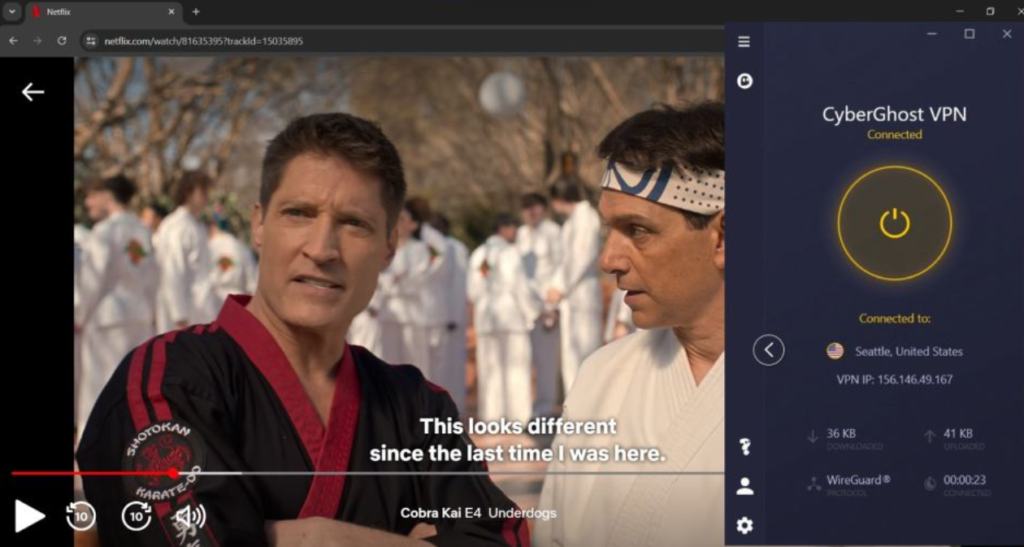
CyberGhost’s signature trick is its streaming servers, each one tagged in the app for a specific service and region. Rather than guessing which of a hundred American servers might let you into Netflix tonight, you scroll to the one that says Netflix US and connect. In practice it is the most foolproof streaming setup I have used, and it is the reason I keep handing CyberGhost to people who find the whole idea of a VPN faintly intimidating. There is no method to learn; you pick the channel you want and the app has already done the work.
The results back the design. In testing, CyberGhost unblocked every Netflix library they tried, and that matches my own habit of hopping across regional catalogs without the dreaded proxy block that stops cheaper services dead. Disney+, BBC iPlayer, Hulu, and Prime Video have all come up cleanly for me on the labeled servers, and when one does eventually get flagged, CyberGhost tends to swap it out before you even notice. It earns a high place on my best VPNs for streaming list on this strength alone.
A little detail on the services, since they behave differently. Netflix is the hardest test because it works so hard to spot VPN traffic, and the dedicated Netflix servers are exactly why CyberGhost clears it where others stumble. BBC iPlayer, which is notoriously strict, has been dependable for me on the UK streaming servers, and Disney+ and Prime Video adapt to the region of whichever labeled server you pick. The one habit worth keeping is to use the streaming-tagged servers rather than a plain location: a generic server may or may not get you in, while the labeled one is chosen precisely for the job, and on the rare night a particular one is blocked, switching to another in the same list almost always sorts it.
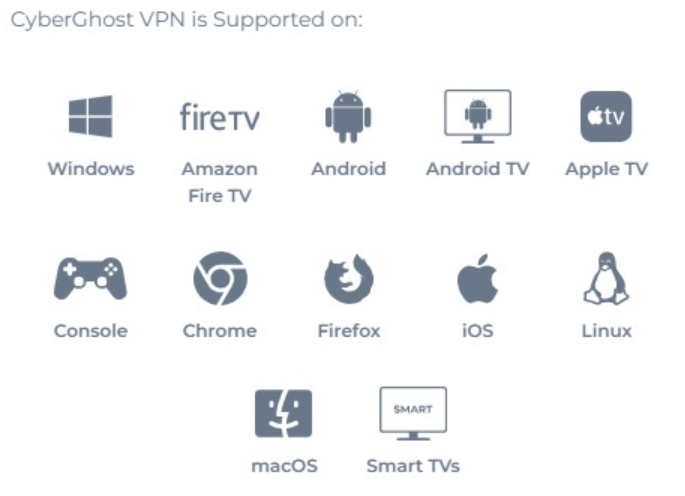
One practical limit belongs here, because it catches people out. CyberGhost has no native app for smart TVs or games consoles, so getting the living-room screen onto a foreign catalog means running the VPN on a compatible router instead, which is more setup than a beginner usually wants. If a one-tap television solution is high on your list, that is the gap to know about. For watching on a laptop, phone, or tablet, though, nothing here is simpler.
How I judge a streaming VPN
A streaming VPN has to clear a different bar than a privacy or budget pick does, so it is worth spelling mine out. The first question is simply whether it gets in, and not just to the US Netflix everyone can manage but to a real spread of regional libraries, because half the point of a streaming VPN is watching your home catalog from abroad or reaching a show that launched somewhere else first. The second is whether it stays in: a server that works tonight and is blocked next week is worse than useless, so what matters is how fast the provider rotates flagged servers back into service.
After that I care about the friction. Do you have to hunt for the one working server, or does the app point you straight at it? Does the picture hold in high definition, or does it sag to a blurry standard-definition stream the moment the VPN is on? And is it quick enough that a film starts when you press play rather than after a wait? CyberGhost’s labeled-server approach is built precisely around those questions, which is why it scores so well on this particular test even when it gives ground elsewhere. It is a streaming specialist that happens to be a competent all-round VPN, rather than the other way around, and judged on the thing it is built for it is among the best I have used.
Who CyberGhost is for
The buyer this suits is easy to name. If streaming is the main reason a VPN has crossed your mind, the labeled servers turn the hardest part of the job into a single tap, and that convenience is worth more than a spec sheet suggests. And if you have never used a VPN before and the category makes you nervous, the gentle app plus that 45-day runway to change your mind make CyberGhost the lowest-risk way I know to get started.
The users I would steer elsewhere are specific. Heavy travelers who need a server in China will be let down. Households with more than seven devices will run out of slots, where an unlimited provider fits better. And privacy purists who want a provider with no corporate baggage will weigh the Kape ownership below and may land somewhere else. For the streamer and the newcomer, though, who together make up most of the people asking me which VPN to buy, this is near the top of the list.
To make it concrete, the user I most often hand CyberGhost to is the one who has just signed up for a streaming service and discovered half the catalog they wanted is in another country, and who has never used a VPN and does not intend to learn much about them. They install it, scroll to the server labeled for the show they are chasing, press connect, and it works, and the 45-day window means if it somehow does not suit them they lose nothing finding out. That person does not care about protocol settings or server counts; they care that the thing does what the box promised on the first try, and CyberGhost is built from the ground up to give them exactly that.
Speed and gaming
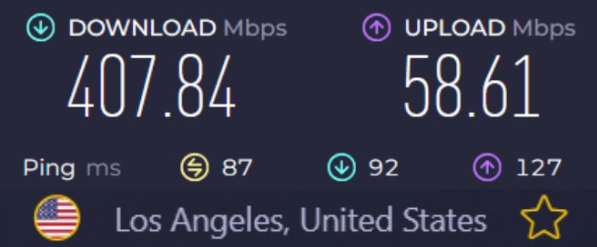
On a nearby server, CyberGhost is quick. WireGuard carries the load, and streaming, calls, and downloads all behave the way they would on a naked connection. Independent testing on a local server has it holding nearly the full line speed, which squares with how invisible it feels close to home. The wrinkle is distance and consistency: across a spread of regions, I measured an average download drop of around 18 percent, and a genuinely distant server can lose more than that again. It is not slow, but it is less uniformly fast than the very top performers, and you will feel the difference on the longest hops more than on the short ones.
For most people, who connect to somewhere close most of the time, that variability rarely bites. And gaming is a genuine bright spot rather than an afterthought: on a close server the ping stays low enough that online matches feel responsive, and CyberGhost even keeps a set of gaming-oriented servers. As long as your underlying connection is decent, a match plays normally, which is more than I can say for some providers that treat gaming as an unsupported edge case. The takeaway on speed is simple: excellent up close, good but uneven far away, and perfectly fine for the streaming and gaming the service is built around.
Server network, NoSpy, and China
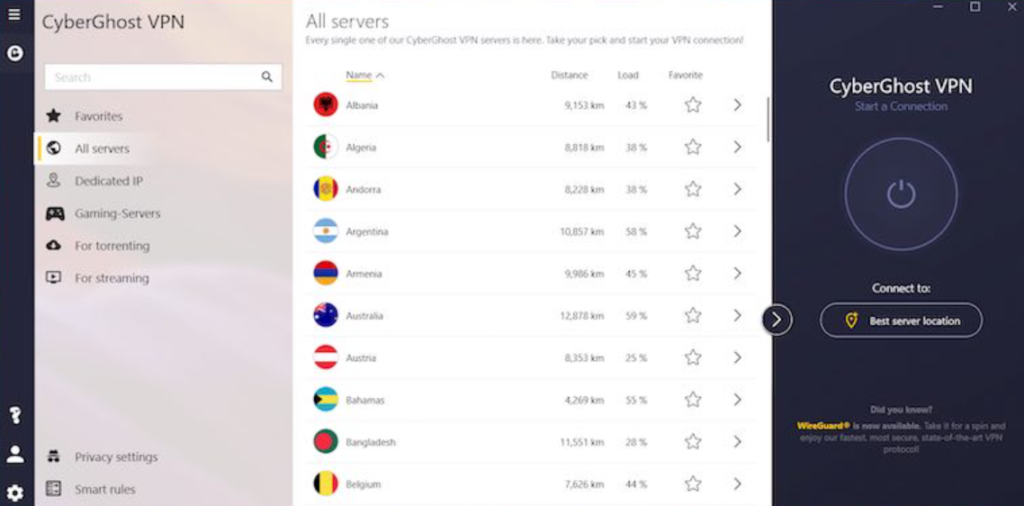
CyberGhost runs one of the larger networks in the industry, with testing counting roughly 11,690 servers across 100 countries. That sheer breadth means a nearby option almost everywhere you go, and it is part of why the streaming servers can be sliced so finely by service and region. The standout within that network is the NoSpy servers, housed in CyberGhost’s own data center in Romania and managed by its own staff rather than rented from a third party. Keeping the machines under its own roof shuts out the third-party access that has tripped up rival providers before now, and as privacy features go it is a substantive one rather than a label.
The size of the network matters too. A streaming VPN lives or dies on having enough servers in the right places that the popular ones do not all get flagged at once, and a network this large gives CyberGhost the room to keep swapping fresh servers in as the platforms block old ones. It also means a genuinely nearby option almost everywhere you are, which is what keeps the speed respectable on the routes that matter to most people. Raw server counts are an easy number for any provider to inflate, so I would not buy on the figure alone, but the practical effect here, plenty of working streaming servers and a short hop to a local one, is real and is part of why the unblocking stays as reliable as it does.
On the strictest censorship I will not dress it up: CyberGhost is not a reliable choice inside mainland China, and testing showed the same verdict. The company does not really pretend otherwise, and that is to its credit, but it means a China traveler should look elsewhere from the start rather than discover the gap on arrival. For ordinary filtered networks, the office blocks and hotel portals most people encounter, it copes without fuss. China is the one environment where the easy-going approach that defines CyberGhost runs out of road.
Security, encryption, and Smart Rules
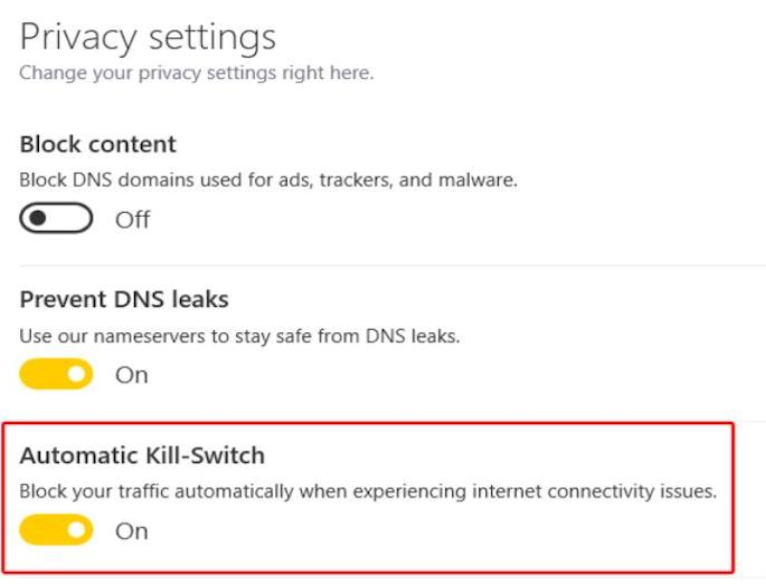
The security groundwork is all present and configured sensibly from the first launch. CyberGhost encrypts with AES-256 and runs the three protocols that matter, WireGuard, OpenVPN, and IKEv2, with an automatic kill switch that cuts your traffic should the tunnel collapse, so your real address stays hidden in that gap. In independent leak testing it comes back clean on DNS and WebRTC, which matches my own checks, and there is nothing here you have to understand to be safe, since the defaults are already right.
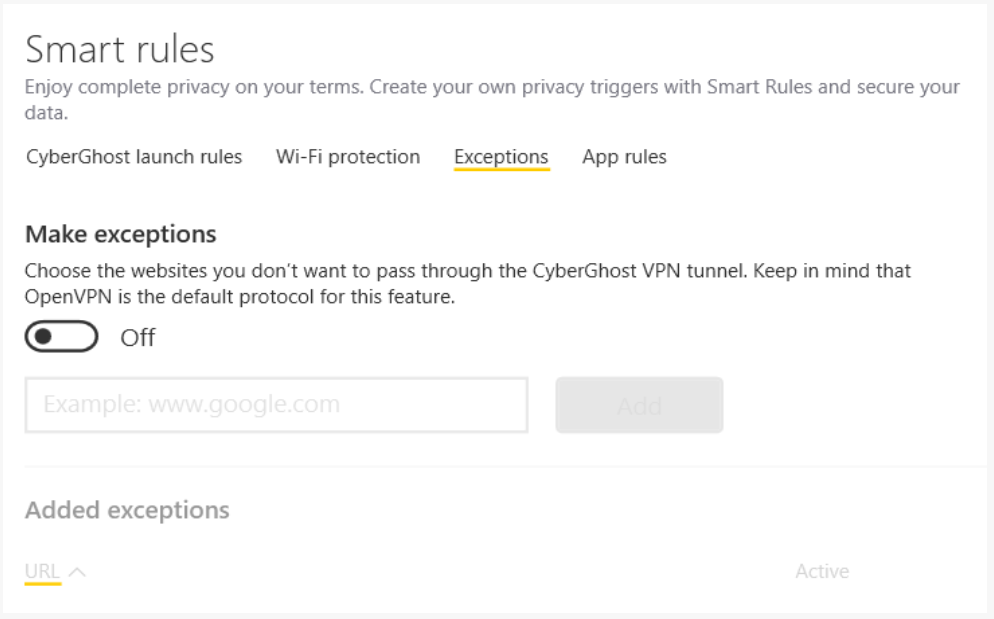
The feature worth singling out is Smart Rules, CyberGhost’s automation panel. It lets you set the app to behave the way you want without thinking about it: connect automatically the moment you join an untrusted network, launch straight into a particular server when the app opens, or fire up a specific program once the tunnel is live. You set it once and forget it, and it turns a manual tool into one that protects you without being asked. For a service built for people who would rather not make a project out of their VPN, that hands-off automation fits the character exactly.
Extra features worth knowing
Beyond the labeled servers and Smart Rules, CyberGhost keeps a handful of extras that round out the package without burying you in toggles. The built-in content blocker stops ads, trackers, and known malicious domains at the network level, which trims the junk before it loads and makes mobile browsing noticeably lighter; I leave it on and forget about it. There are browser extensions for Chrome and Firefox when you want quick, lightweight cover inside the browser rather than the full client, and the automatic WiFi protection, set through Smart Rules, connects you the instant you join a network you have not marked as trusted.
For people who need a stable address, you can buy a dedicated IP as an add-on, one nobody else shares, which helps when a bank or a work system gets twitchy about a login arriving from a different place each time. CyberGhost also sells a few security extras as optional bolt-ons rather than baking them into the core price, so you can take just the VPN if that is all you want. The read is that the extras here are useful rather than essential: the labeled servers and the easy app are the reason to buy CyberGhost, and everything in this section is a welcome bonus on top rather than the headline.
Privacy, audits, and the Kape question
On the fundamentals, CyberGhost’s privacy case is strong. It keeps no activity logs, it is based in Romania, which sits outside the major intelligence-sharing alliances and has resisted EU data-retention pressure, and an outside firm has verified its no-logs policy, most recently Deloitte in 2024 as reported. Add the NoSpy servers in its own data center and you have a posture that, on paper, holds up against providers charging a good deal more.
Now the part the glossier reviews tend to skim. CyberGhost is owned by Kape Technologies, the same group that owns ExpressVPN and Private Internet Access, and Kape’s corporate history has drawn real scrutiny from privacy advocates given where it came from. I am not going to wave that away. What I can say is that the audits have continued under that ownership, the Romanian base and the NoSpy infrastructure remain, and I have seen no evidence of the logging the worry implies. For a streaming-first tool, the audited policy and the Romanian jurisdiction outweigh the ownership concern in my judgment. If provable corporate independence is your hard line, though, that is a fair place to draw it, and a provider like ProtonVPN sits higher on my best VPNs for privacy list for exactly that reason.
Torrenting and Tor
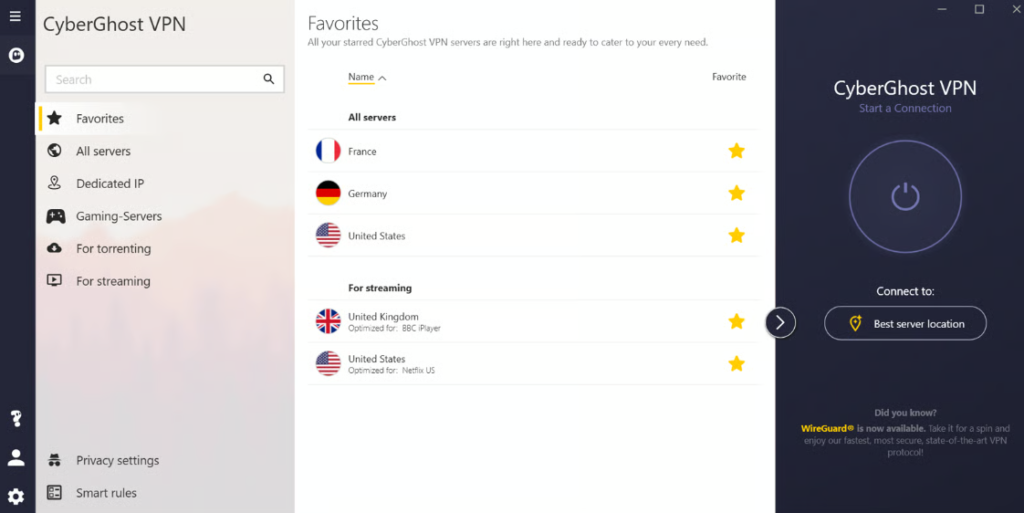
CyberGhost handles torrenting the same way it handles streaming, with dedicated servers marked for P2P right in the app, so you connect to one built for the job rather than hoping a random server allows it. The kill switch makes sure your real IP never surfaces in the swarm if the tunnel blips, and downloads move quickly on the nearby P2P servers. It is about as beginner-proof as torrenting gets, which is rarer than it sounds, and it earns a comfortable spot on my best VPNs for torrenting list. There is also support for routing through the Tor network for the moments you want an extra layer of anonymity on top of the VPN, which is a thoughtful inclusion for a service that otherwise leans casual. Between the labeled P2P servers and the dependable kill switch, downloading on CyberGhost asks almost nothing of you, which is the whole point.
The Tor support deserves a word more, because it is unusual on a service this casual. Routing your traffic into the Tor network through the VPN means you can reach onion sites without firing up a separate browser, layering Tor’s anonymity on top of the encrypted tunnel for the rare occasion you want it. Most people never will, and that is fine; it sits out of the way until you go looking for it. The pattern across the whole torrenting and privacy side is the same as everywhere else in CyberGhost: the powerful option is present for the person who wants it, but the default path is simple enough that nobody has to touch it, which is the balance a beginner-focused VPN has to strike and most fail to.
CyberGhost abroad
Streaming and travel are the same use case wearing two hats, and it is on the road that CyberGhost’s labeled servers earn their keep most clearly. The thing a traveler really wants is their home catalog to follow them, and picking the server marked for your country’s Netflix or your home broadcaster turns that from a fiddly chore into a single tap. Through a long winter staying in Tbilisi, the British and US catalogs I wanted were a scroll-and-click away rather than a guessing game, and the dependable iPlayer access in particular is not something I can say about every provider that claims to do streaming.
The boundary is the same one that shapes the rest of the review. On the ordinary difficult networks of travel, the hotel WiFi and the café portals, CyberGhost connects and keeps your home services working without drama. The place it runs out of road is heavy state censorship, China above all, where the easy-going design simply is not built to fight that hard. So as a companion for the kind of travel most people do, weekends and holidays and the odd long stay in a normal country, it is an easy thing to carry; as a tool for getting online behind the Great Firewall, it is the wrong one, and I would rather tell you that now than have you discover it after you have landed.
The apps, ease of use, and support
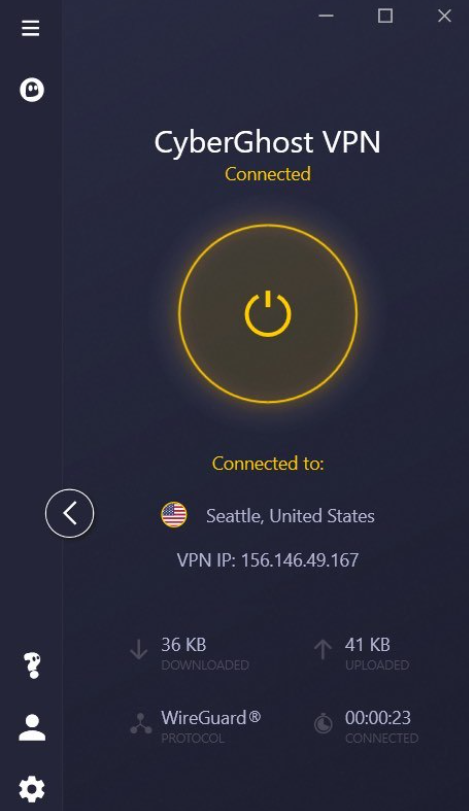
This is where CyberGhost wins its beginner reputation outright. Across Windows, macOS, iOS, and Android the apps are clean and obvious, with the labeled streaming and torrenting servers doing the deciding for you and very little left to get wrong. Hand this to someone who has never touched a VPN and they will be connected and protected in a couple of minutes without reading a word of instruction, which is exactly what you want when you are setting one up for a parent or a friend. If that describes you, it is one of my top picks for getting started, and the gentle learning curve is half the reason.
The one structural limit is the device count: a single subscription covers seven simultaneous connections, which is fine for an individual or a couple but tight for a larger household, where an unlimited provider stretches further. Support, on the other hand, is a strength, running through 24/7 live chat that has answered quickly and solved the problem on the occasions I have needed it, plus a deep library of step-by-step guides for the people who would rather read than chat. For a service pitched at newcomers, having a real person available at any hour is exactly the safety net the audience needs.
The consistency across platforms is part of the charm too. The layout, the labeled server lists, and the one-tap connect look and behave the same on a laptop as on a phone, so once a person has learned the app on one device they already know it on the next, and helping a less technical relative get set up becomes a two-minute call rather than an afternoon. It is the sort of polish that does not show up on a feature comparison but defines whether a household keeps using the thing, and CyberGhost has clearly spent real effort on it rather than treating the apps as an afterthought to the server network.
Setting up CyberGhost
Few VPNs are easier to get running. Create an account, install the app, sign in, and the home screen drops you straight into the labeled server lists; pick the one that matches what you are trying to do and connect. For streaming, choose the server tagged with the service and country you want; for downloading, pick a P2P server; for everything else, the one-tap best-location option is enough. The two settings worth a glance are the kill switch, which you will want on, and Smart Rules, where you can tell the app to connect itself on untrusted WiFi. For a smart TV or console, the route is a compatible router rather than a native app, which is the one part of setup that asks for patience. New to all this? My VPN setup guide covers the basics on every platform.
CyberGhost pricing and the 45-day guarantee
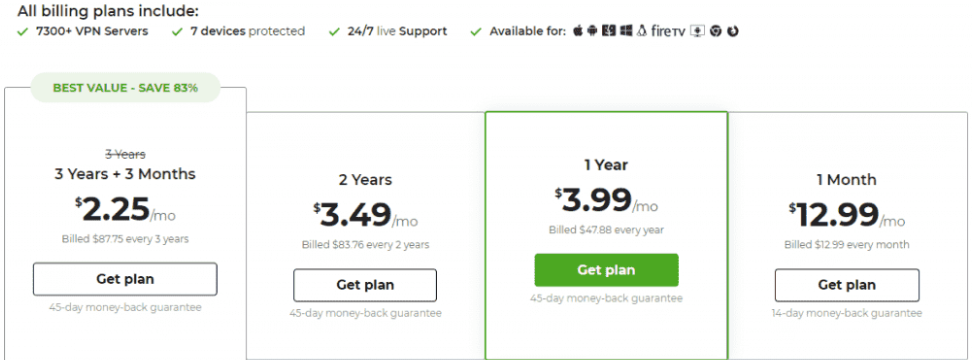
CyberGhost is cheap on the long term and ordinary on the short, which is the usual VPN shape. The best value comes from the multi-year plan, which drops to around $2 a month and is often advertised closer to $1.59 with the running promotion, while the one-month option costs roughly six times the long-term rate. The headline feature on the commercial side is that 45-day money-back guarantee on the long plans, the most generous in the lineup, which hands you a month and a half to put the service through real use before you are committed to anything. The shorter plans carry a 14-day guarantee instead, so the long term is the one that rewards you twice, on price and on trial length. Payment runs through the usual cards, PayPal, and cryptocurrency, and the low long-term cost lands it on my cheapest VPNs list as well.
One thing to go in clear-eyed about, as with most of this industry, is the renewal. The headline price is the introductory rate on a long term, and it steps up when that term ends, so a quick calendar note before the first renewal is worth the ten seconds it takes. Even at the higher rate CyberGhost stays among the more affordable names, so this is not a trap so much as the standard shape of VPN pricing, but knowing it beats an unexpected charge a couple of years down the line. The genuine standout on the commercial side remains that 45-day guarantee, which is long enough to cover a holiday, a sports season, or a binge of the show you bought it for, and to get your money back if it falls short.
| Key facts | CyberGhost |
|---|---|
| Price | From about $2/mo (multi-year; promos near $1.59) |
| Money-back guarantee | 45 days (long plans), 14 days (monthly) |
| Simultaneous devices | 7 |
| Servers | 11,690 in 100 countries (company figure) |
| Jurisdiction | Romania (Kape Technologies) |
| Protocols | WireGuard, OpenVPN, IKEv2 |
| Encryption | AES-256 |
| Logging | No-logs, audited by Deloitte (2024) |
| Streaming | Netflix, Disney+, BBC iPlayer, Hulu, Prime Video |
| China | Not reliable |
45-day money-back guarantee on long-term plans.
What is new for 2026
CyberGhost has kept the upgrades coming rather than resting on the streaming reputation. The server network has grown into the eleven-thousand range, which widens the spread of those service-specific streaming locations and keeps the popular ones from clogging. WireGuard support has matured into the default for most people, lifting the everyday speeds, and the audited no-logs policy has been renewed rather than left as a one-off press release, with the Deloitte check carried into 2024. The app has had steady usability work too, which matters more for a beginner-focused service than for any other kind. None of it changes the core identity, a streaming-first VPN that anyone can pick up, but it is the sort of ongoing investment that tells you the service is being looked after rather than coasting on a name.
How CyberGhost compares
Against the all-rounder, the choice comes down to what you value. NordVPN is faster on the long routes and stronger on privacy and China, while CyberGhost is easier to use, cheaper, and far more generous with its guarantee. If unlimited devices for a busy household is the priority, Surfshark is the better fit and costs about the same. And if provable, independent privacy is the goal, ProtonVPN with its Swiss base and no corporate baggage is the name to weigh instead. CyberGhost’s lane is clear and it owns it: streaming, simplicity, and the longest runway in the business to decide whether it belongs on your devices. The useful way to frame the choice is that the others ask you to prioritise something specific, top speed, unlimited devices, or maximum privacy, while CyberGhost asks only that you want streaming to be easy. If that is genuinely your main goal, it wins the comparison outright; if it is one priority among several, one of the all-rounders is the safer pick, and there is no shame in either answer.
Reliability and the honest limits
After living with it, the drawbacks worth naming come down to three. The Kape ownership is the one most people will weigh, not because there is evidence of wrongdoing but because some buyers simply prefer a provider with a cleaner corporate lineage. The distance speed is the practical one: nearby it is excellent, but the further you reach the more the consistency wobbles, so a constant long-haul traveler will notice it. And the seven-device cap is a real ceiling for a full household in a market where several rivals have dropped the limit entirely.
What you get in exchange is the easiest streaming setup going, a genuinely friendly app, an audited policy from a privacy-friendly base, and a month and a half to test it all at no risk. None of the limits are dealbreakers for the streamer or the newcomer CyberGhost is built for, or it would not hold the spot it has earned in my recommendations. But a review that buried them beneath the strengths would be doing you a disservice, and the whole point of the long guarantee is that you can check every one of these claims against your own use before a penny is on the line.
CyberGhost FAQ
Is CyberGhost good for streaming?
Yes, it is one of the best. Its servers are labeled for specific streaming services and regions, so you connect to the one marked for Netflix US or BBC iPlayer and it loads. Independent testing unblocked every Netflix library tried, along with Disney+, Hulu, and Amazon Prime Video.
Is CyberGhost safe and private?
Yes. It uses strong encryption, keeps no activity logs, operates from Romania outside the major surveillance alliances, and was independently audited by Deloitte in 2024. The one caveat is that it is owned by Kape Technologies, which is worth knowing if corporate independence matters to you.
How long is the CyberGhost money-back guarantee?
45 days on the long-term plans, the longest in the industry, and 14 days on the monthly plan. Either way you can try it and claim a full refund if it is not for you, but the long plan gives you far more room to decide.
Does CyberGhost work in China?
Not reliably. Mainland China’s censorship is more than it can dependably handle, and independent testing agrees. If China is your use case, a provider with a stronger record behind the firewall is the safer bet.
How many devices does CyberGhost support?
Seven connections at once per account, which suits an individual or a couple. A larger household that wants to cover more screens at once would be better served by a provider with unlimited connections.
What are NoSpy servers?
NoSpy servers are housed in CyberGhost’s own data center in Romania and run by its own staff rather than a third party. Keeping the hardware in-house removes the outside access that has caused incidents for other providers, which makes them a genuine privacy upgrade rather than a marketing label.
Is CyberGhost good for beginners?
It is one of the best first VPNs there is. The app is clean and self-explanatory, the labeled servers remove the guesswork, and the 45-day guarantee plus 24/7 support give a newcomer a wide, low-risk margin to get comfortable.
Can CyberGhost run on a smart TV?
Not through a native app. CyberGhost does not offer one for smart TVs or consoles, so covering the living-room screen means running the VPN on a compatible router instead. For laptops, phones, and tablets, the apps are as easy as they come.
Does CyberGhost slow down your connection?
On a nearby server, barely, with independent testing on a local connection holding close to the full line speed. Across a wider spread of regions the average drop measured around 18 percent, and a very distant server can lose more, so the speed is excellent up close and merely good at long range.
Is CyberGhost owned by Kape Technologies?
Yes. CyberGhost belongs to Kape Technologies, the same group behind ExpressVPN and Private Internet Access. The audits have continued under that ownership and the Romanian base and NoSpy servers remain, but if a provider’s corporate lineage matters to you, it is worth factoring in.
Does CyberGhost offer a free trial?
There are short free trials on some platforms, but the bigger draw is the 45-day money-back guarantee on the long plans, which works as a no-risk trial in all but name: subscribe, use it fully, and claim a refund within the window if it does not fit. No other major VPN gives you that much room.
Verdict: who should buy CyberGhost
Buy CyberGhost if streaming is your main reason for wanting a VPN, or if you want the gentlest possible introduction to using one. The labeled servers, the friendly app, and the 45-day guarantee combine into the lowest-risk way I know to get started, and the audited no-logs policy from a privacy-friendly Romanian base means you are not trading safety for that ease. For the streamer and the newcomer, it is a genuinely easy yes.
The users who should look elsewhere are clear enough: the China traveler, the household that needs more than seven devices, and the privacy purist who wants a provider with no corporate ties to weigh. For them, NordVPN, Surfshark, or ProtonVPN will fit better, and choosing one of those is a sound call rather than a compromise. But for everyone else, especially the people who just want their shows to load without a fight, CyberGhost is one of the safest picks in 2026, and you can see how it stacks up against the field on my best VPNs of 2026.
It is worth trying while the long-plan deal is live. With 45 days to claim your money back, you have more room than any other VPN gives you to decide it earns a place on your devices, so there is little reason not to put it to the test. Install it, point it at the catalog you have been missing, and you will know within an evening whether it is the easy answer you were hoping for. For most of the people who ask me, the ones who just wanted to sit down and watch something that would not play before, it has turned out to be exactly that, with none of the fuss they had braced for.
45-day money-back guarantee on long-term plans, cancel anytime.
Leave a Reply
You must be logged in to post a comment.