

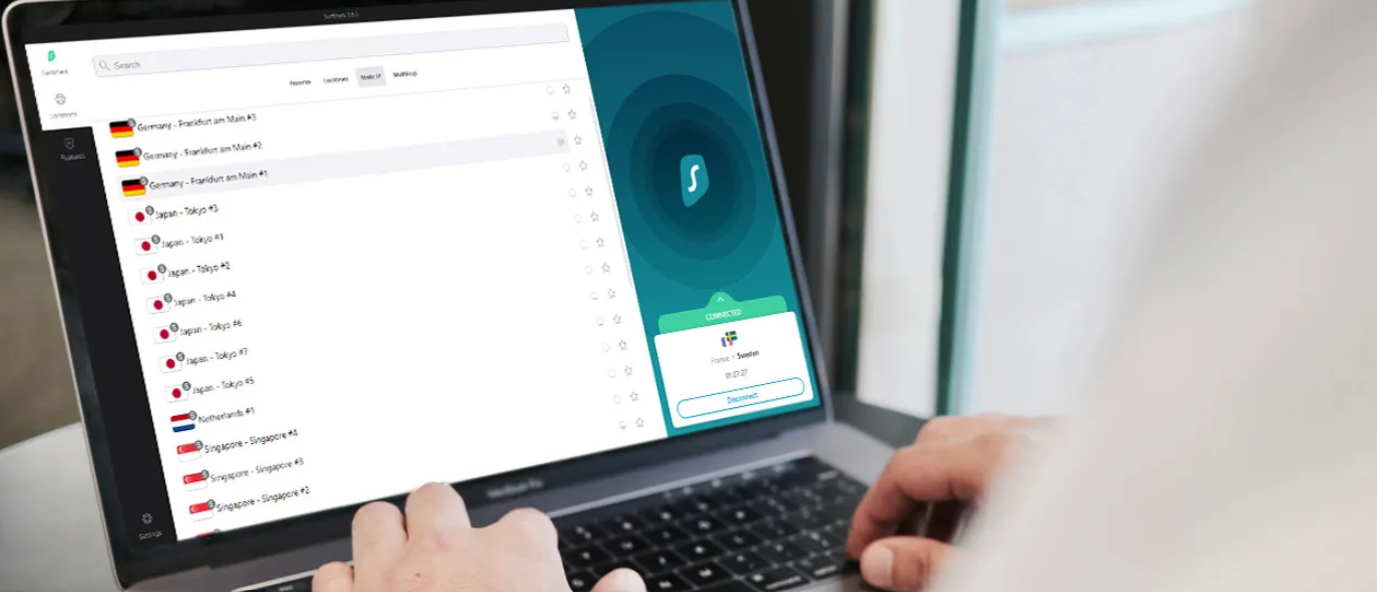
Count the things in your home that touch the internet and the number gets silly fast: two phones, a couple of laptops, a tablet that lives down the side of the sofa, a smart TV, a console, maybe a partner’s devices and a kid’s. Most VPNs hand you five or ten slots and make you ration them. Surfshark tears that page out of the rulebook. One subscription covers every device you own, all at once, with no counting and no logging out, and it costs less than almost anything else I would put my name to. That single decision is why it has been the VPN running on every screen in my life for a couple of years now. My rating: 4.6 out of 5.
The short version, so you have it early: Surfshark is the best value in VPNs in 2026, and the low price no longer drags the quality compromises behind it that it once did. It is quick, it is audited, it streams almost everything, and it carries a deeper bag of features than its sticker has any right to. If you are watching your spending or covering a whole household, this is where I would have you start, and the rest of this review is why, gaps included.
30-day money-back guarantee, cancel anytime.
Table of Contents
Surfshark at a glance
Two years of running Surfshark across a houseful of devices and a great deal of hotel WiFi, distilled into the good and the not-so-good.
What it gets right:
- Unlimited simultaneous connections, so one subscription genuinely covers everyone under the roof.
- The lowest long-term price of any VPN I would recommend, near $1.99 a month.
- A no-logs policy verified by Deloitte, running on RAM-only servers.
- Streaming that simply works, with Netflix, BBC iPlayer, Disney+, and the rest loading reliably.
- A genuinely deep feature set: CleanWeb, MultiHop, Camouflage, Alternative ID, and an optional data-removal service.
What I would change:
- It is not the most dependable pick for the very strictest censorship, mainland China included.
- Long-distance speeds trail the absolute fastest premium providers by a hair.
- The rock-bottom price needs the two-year commitment; the monthly rate is steep.
- It now shares a parent company with the market leader, which matters if independence was the point.
Unlimited devices, one price
This is the headline and it has earned the top billing. Where nearly every rival caps you at five or ten simultaneous connections, Surfshark sets no ceiling at all. I have it running on two laptops, a phone, a tablet, and the living-room television, plus a family member’s gear, every bit of it under a single login. For a household, or for anyone with a drawer full of half-forgotten gadgets, that one feature can make Surfshark cheaper per device than a so-called budget rival charging the same money while still counting your connections.
The benefit that sneaks up on you is the one you stop noticing: you never have to unhook one device to protect another. Anyone who has tried to log a VPN out on a phone with a single bar of signal, in an airport, while a boarding call goes out, will understand why that matters more than a spec sheet suggests. With Surfshark the question never comes up. Every screen you own is simply covered, all the time, and that absence of friction is worth as much as any flashy feature on the list below.
It changes how you use the thing, too. Because there is no slot to ration, you stop being precious about it: you put it on the spare tablet, the work laptop, the kid’s phone, the device you only travel with, without weighing whether each one is worth a precious connection. That abundance is the difference between a VPN you switch on for the important moments and one that simply runs everywhere by default, which is the version that protects you, because the breach you do not see coming is rarely on the device you remembered to cover. For a single dollar-ish a month, having every gadget you own protected without a second thought is the most genuinely useful thing Surfshark sells.
Surfshark for families and shared homes
The unlimited-connection trick pays off hardest in a busy household, and it is worth doing the sum out loud. Picture a family of four: two parents with a phone and a laptop each, two kids with phones and a shared tablet, a smart TV in the lounge, and a console under it. That is already nine or ten devices, which is the exact point at which a capped rival starts forcing you to choose who goes unprotected or to buy a second subscription. Surfshark just covers the lot, and the per-device cost collapses toward nothing as you add more.
There is a softer benefit too, which is that you can set it up for the less technical people in the house and then forget about it. Install it on a parent’s laptop or a teenager’s phone, switch on auto-connect, and it protects them on every café and school network without anyone having to remember to turn it on. For whoever in the family gets drafted as the household IT department, that hands-off reliability is worth more than any single feature, and the consistent app across platforms means you can guide a relative through a setting remotely without either of you getting lost. A household is precisely the use case Surfshark was built around, and it shows.
Speed across the network
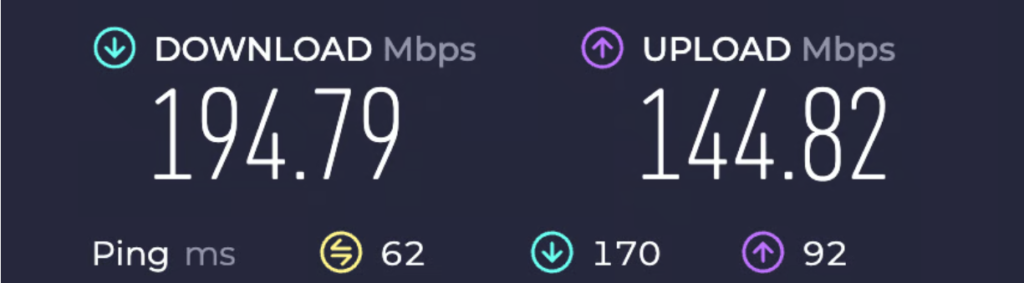
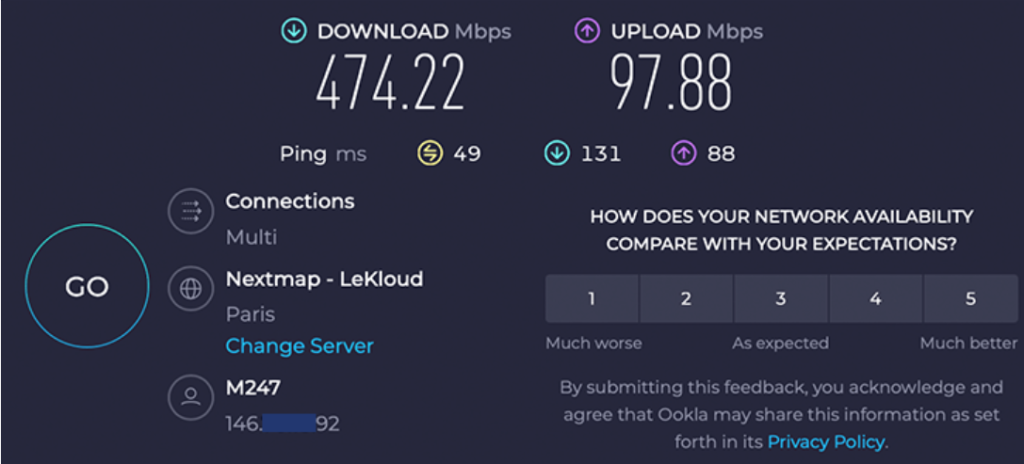
Surfshark runs on WireGuard, and on a nearby server it is quick enough that I stopped registering it was on. Streaming in high definition, video calls, ordinary browsing, none of it carries a drag worth mentioning. The number that surprised me is how small the toll really is: in testing, the average download drop measured around one percent, which is close to a rounding error and better than most of the field manages.
Distance is where every VPN starts to show strain, and Surfshark handles it gracefully. It leans on a routing technology it calls Nexus, which can pass you between servers more smoothly than the old model, and across transatlantic routes I have streamed and worked without the spinner of doom appearing. Other testing puts the loss on longer hops in the five-to-twenty percent range, which lines up with my own use, and that is still firmly in the territory where you will not feel it day to day. It is not quite the equal of NordVPN or ExpressVPN on the very longest intercontinental routes, and I would not pretend it is, but the gap is small and most people will live their whole subscription without noticing it.
Gaming benefits from the same quickness. On a server near home the latency stays low enough that online matches feel normal, and because the connections are unlimited you can cover the console, the PC, and your phone at the same time without the usual juggling. It is not pitched as a gaming VPN and does not need to be; it simply gets out of the way, which is all a gamer wants from one.
The test that matters most for a household is what happens when the connection is under load, and Surfshark holds together there. With someone streaming in one room, a download running in another, and a couple of phones idling on the network, the per-device experience stays smooth rather than collapsing into the buffering you might fear from a budget service. The fast RAM-only servers and the small per-connection toll are what make that possible, and it is the practical reason the unlimited-device promise is more than a marketing line: covering ten devices is only useful if covering ten devices does not grind them all to a halt, and here it does not.
How I judge a value VPN
It is worth saying what bar a budget VPN has to clear with me, because the cheap end of this market is where corners get cut and buyers get burned. The first thing I look for is whether the low price has been paid for with your data, which is the oldest trick in the category; a no-logs policy that an outside firm has audited is what rules that out, and Surfshark has one. The second is whether the security is real or decorative: current encryption, a kill switch that fires when it should, and clean leak results, not a long marketing list of features that fold under pressure.
After that I care about the things you feel day to day. Does it stay quick enough that you forget it is on? Does it open the streaming services you pay for rather than just promising to? Does the app work the same on every device so a household can share it without a training session? And when something breaks at an awkward hour, is there a human to reach? A budget VPN that passes those tests is rare, because most of them save money exactly where it hurts. Surfshark passes them, which is the whole reason it has earned the value crown rather than just claimed it, and it is the lens the rest of this verdict is built on.
Who Surfshark is for
The buyer Surfshark fits best is easy to picture: the household, or the individual with a pile of devices, who wants strong protection without paying a premium for it. If you are kitting out a family where everyone watches something different on a different screen, the unlimited connections plus the reliable streaming make this an almost automatic choice, and the price makes it an easy yes rather than a debated purchase.
It also makes a natural first VPN. It is cheap enough that the decision barely registers, and polished enough that you will not outgrow it in a month and go shopping again. The users I would steer elsewhere are narrow: those who need the last few percent of long-distance speed, the ones whose use depends on reliable access inside China, and anyone for whom a provider with no link to the market leader is a hard requirement. For everyone chasing value, which is most people most of the time, Surfshark is the front of the queue.
Here is the user I most often steer toward it: the one staring at a renewal notice from a pricier VPN and wondering why they are paying so much to cover three devices. They switch, suddenly have every screen in the house protected for a third of the outlay, and discover the streaming and the speed are near enough identical to what they left. That buyer is not chasing the absolute fastest connection or the most exotic privacy feature; they want a competent, trustworthy VPN that does not insult their wallet, and Surfshark is built precisely for them. The person who should hesitate is the one whose use is unusual, constant long-haul travel, a China requirement, or a hard rule against any provider tied to the market leader, and for them theanswer is to point elsewhere.
Security and leak protection
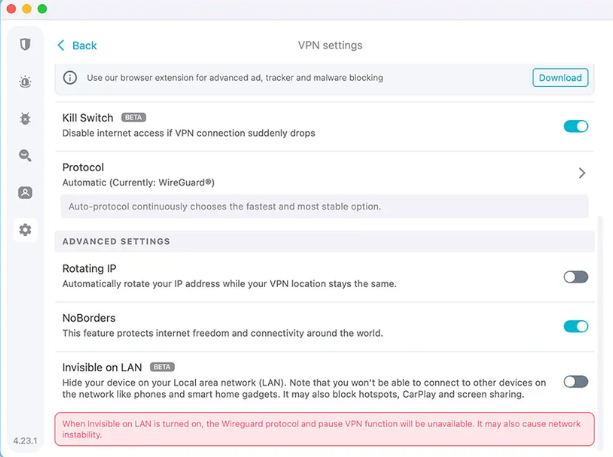
The security groundwork is all here and set correctly before you touch a thing. Surfshark protects your traffic with AES-256 on OpenVPN and ChaCha20 on WireGuard, the same ciphers the premium names use, and the protocol choice is automatic unless you want to override it. A kill switch sits underneath, severing your internet if the tunnel ever falls so your real address cannot escape during the lapse, and the major review labs report no DNS or WebRTC leaks from it, which squares with my own spot checks.
The piece worth calling out is NoBorders, a mode that reshapes the app for use on restrictive networks where VPNs are unwelcome. Paired with Camouflage, which I will get to below, it is the reason Surfshark keeps working on the filtered office and hotel connections that reduce lesser apps to a spinning wheel. None of this asks anything of you, which is the point: the defaults are right, and the harder options are there for the day you need them.
Features worth using
Surfshark crams in more than its price hints at, and the welcome surprise is how much of it is useful rather than padding to lengthen a list. A walk through the ones I reach for.
CleanWeb, MultiHop, and Camouflage
CleanWeb strips ads and trackers and blocks malicious and phishing sites, and it works well enough that I leave it on permanently rather than reaching for a separate blocker. MultiHop routes your connection through two countries for an extra layer of cover, and the dynamic version lets you build your own entry and exit pair rather than pick from a fixed menu. Camouflage mode disguises VPN traffic so it reads as ordinary traffic, which is what keeps you connected on networks that actively hunt for VPNs. In a co-working space with aggressive filtering, Camouflage has more than once been the thing that turned a blocked connection into a working one.
Bypasser, Rotating IP, and Alternative ID
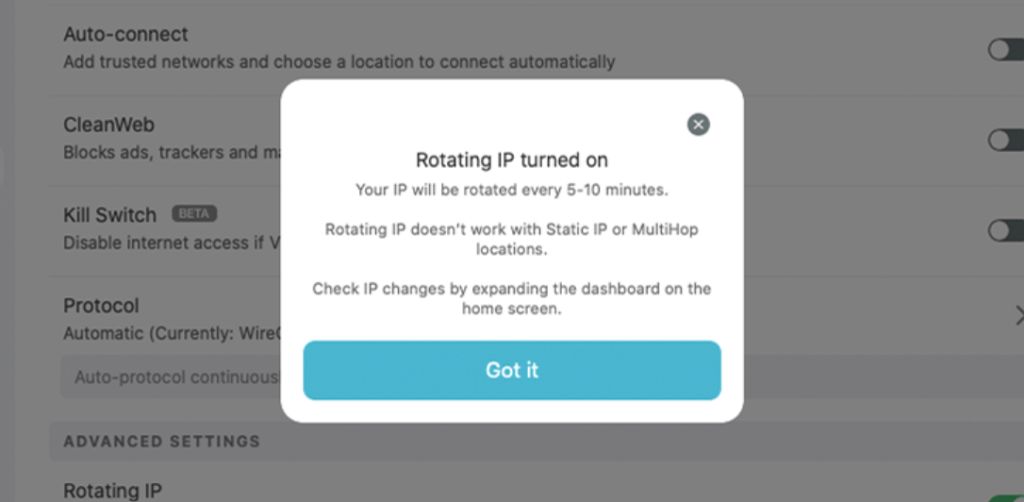
Bypasser is Surfshark’s name for split tunneling, letting you route chosen apps outside the VPN, and it lives on the Windows, macOS, and Android apps. Rotating IP cycles your address periodically without dropping the connection, a privacy bonus. The one I did not expect to like is Alternative ID, which generates a separate email and persona for sign-ups so your real inbox stays out of the data-broker pipeline. The higher tiers stack on more still, including an antivirus, breach alerts, and Incogni, a service that chases data brokers to delete the records they hold on you, which I cover in its own section below.
Dynamic MultiHop, static IP, and the power-user toggles
Beyond the headline trio, Surfshark keeps a set of tools for people who want more control than the connect button offers. Dynamic MultiHop is the one I find genuinely clever: where ordinary multi-hop pins you to a fixed pair of countries, the dynamic version lets you build your own route, entering through one country and exiting through another of your choosing. It is overkill for checking email and exactly right for the days you want to make your path harder to follow. A static IP gives you a consistent address that does not shift between sessions, which smooths over the moments a bank or a work login balks at an address that changes every time, and a dedicated IP that nobody else shares is available if you need to go further. At the opposite extreme, the rotating IP cycles your address on a timer without dropping the tunnel, for when unpredictability is the whole goal.
What stops these from feeling like a scattered grab-bag is Nexus, the routing layer that lets the network behave as one connected system rather than a row of isolated servers. It is the plumbing behind features like dynamic routing and IP rotation, and it is the sort of infrastructure investment you would expect from a premium provider rather than the value pick. Most people will leave every one of these toggles alone, and that is fine; the point is that the depth is there if you ever reach for it, which is rare at this price.
Privacy, audits, and the Nord connection
Surfshark keeps no activity logs, runs its fleet entirely from RAM so a powered-down server retains nothing, and has had the no-logs claim checked by Deloitte, most recently in a 2025 audit reported by thebestvpn. That combination, RAM-only hardware plus a big-four audit, is the gold standard a budget provider is not supposed to be able to afford, and Surfshark clears it. The home base is the Netherlands, which sits inside the nine-eyes intelligence-sharing group, and I would rather see a provider parked outside those alliances. The counter is that the Netherlands imposes no mandatory data-retention law on VPNs, and a service that truly keeps nothing has nothing to surrender regardless of the address on the door.
The fact that deserves daylight is ownership. Since 2022 Surfshark and NordVPN have shared a parent company, Nord Security. The two still run as separate services, with separate apps, separate networks, and separate audits, and nothing about the arrangement has changed how either behaves from one day to the next. But if part of your reason for choosing Surfshark was to steer clear of the biggest player in the market, that is the context you want in hand before you pay, while you can still act on it. I get into the family resemblance in my NordVPN vs Surfshark comparison, and it factors into where each lands on my best VPNs for privacy list. For most buyers it changes nothing; for the independence-minded, it is the single thing to weigh.
It is worth being precise about what the audit and the RAM-only hardware buy you, because “audited no-logs” gets thrown around loosely. An independent firm examining the logging setup means a third party with its own reputation on the line has looked at whether the claim holds, rather than you taking a sales page at its word. RAM-only servers mean that even in the worst case, a machine physically seized or powered down, there is no stored history to recover, because nothing is written to a disk in the first place. Neither is a magic guarantee, and no reviewer would call any VPN unbreakable, but together they put Surfshark’s privacy posture on the same footing as providers charging several times the price. For a service this cheap to clear that bar is the genuine surprise of the whole review, and it is the reason the old warning about getting what you pay for does not apply here.
Server network and restrictive countries
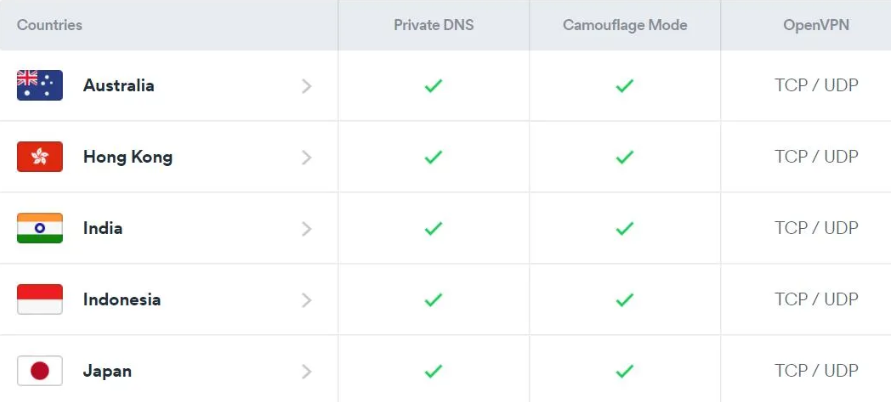
Surfshark advertises a network in the region of 4,500 servers spread across 100 countries, all of them RAM-only and running on 10 Gbps ports. That country spread is broader than most of the field, and for everyday use the breadth matters more than the raw count, because it means a nearby server almost everywhere I have traveled and little sense of congestion even at peak hours. The fast ports are part of why the speed holds up so well under load.
The all-RAM design is a privacy point as much as a performance one. Because nothing is written to a disk, a server that is seized or simply powered down has nothing stored to give up, the same hardening the most security-conscious providers have moved to. Combined with the broad country spread, it means the network does double duty: wide enough that a quick local server is rarely more than a tap away, and built so that even the servers themselves are not a weak link. For a provider selling on price, matching the premium names on this particular front is more than the sticker would lead you to expect.
On the harshest censorship I will give it to you straight, because this is where buyers get caught out. Surfshark’s Camouflage and NoBorders modes help on filtered networks and have worked for me in several restrictive places, but mainland China is the exception, and the company does not really claim otherwise. And testing reached the same conclusion, putting it down to the sheer reach of the Great Firewall. If China is the specific thing you are buying for, weigh that hard and pick a provider proven to hold up behind the firewall. Everywhere else that gives VPNs trouble, the hotel captive portals and the locked-down offices, Surfshark copes without drama.
Streaming with Surfshark
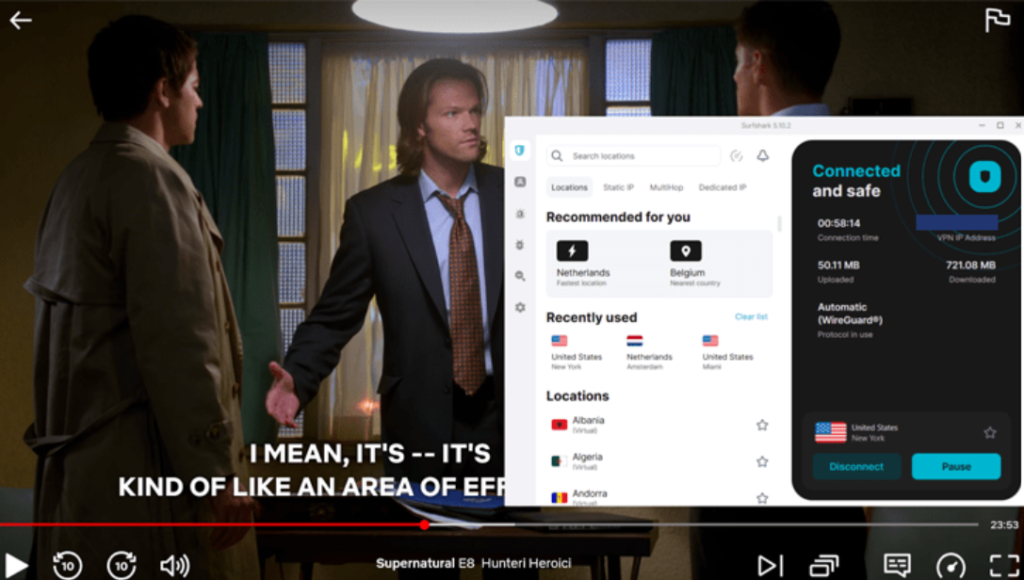
Streaming is where Surfshark outperforms its budget label. It opens the services that matter, and not just the headline US catalog. In testing it unblocked every Netflix library they tried, which matches my own experience of hopping between regional catalogs without the proxy error that kills lesser VPNs. BBC iPlayer, Disney+, Hulu, and Amazon Prime Video have all loaded for me on the right servers, and Netflix in particular has been dependable across a wide spread of countries rather than just one or two.
For the hardware a VPN app cannot run on, the smart TVs and games consoles, Surfshark offers a smart-DNS option that does the region-switching another way. There is no encryption involved, so it is a streaming convenience rather than a privacy feature, but for getting a living-room set onto a foreign catalog it does the job. Pair the streaming muscle with the unlimited connections and Surfshark becomes the obvious pick for a household where four people want four different things on four different screens, which is why it sits high on my best VPNs for streaming list.
Surfshark on the road
Travel is where I have leaned on Surfshark hardest, and it holds up to the abuse. The unlimited connections matter more on the move than anywhere else, because a travel kit is rarely one device: a laptop for work, a phone for everything, a tablet for the flight, maybe a partner’s gear sharing the same trip. With Surfshark every one of them is covered under a single login, so there is no rationing on the road and no scramble to free up a slot when you pick up a new SIM.
The other half is getting online at all on networks that would rather you did not. In a hostel in Mexico City with a captive portal that throttled anything resembling a VPN, flipping on Camouflage and NoBorders was what turned a dead connection into a working one, and it has done the same on more than one airport and hotel network since. Those two modes are the unsung heroes of the feature list, the kind you ignore until the evening the WiFi fights you. The exception stays China, where the Great Firewall is a harder problem than a hostel router and Surfshark is not the tool I would carry. Everywhere else I have pointed it, it has kept my home streaming, my work, and my banking app working as if I had never left, which is the entire point of travelling with a VPN in the first place.
Torrenting and P2P
Torrenting is supported across the whole network rather than fenced onto a handful of servers, which keeps it simple, and the kill switch keeps your real address out of the swarm if the connection stumbles. I have run large transfers on it without trouble, and the strong speeds mean a download does not become an all-day affair. The one mild inconvenience is that you may need to pick a P2P-friendly server manually rather than have the app route you there automatically, a small step that the most polished torrenting VPNs spare you. With unlimited devices, a dependable kill switch, and quick transfers, it still earns a comfortable place on my best VPNs for torrenting list.
Bypasser pairs neatly with torrenting too. If you want your torrent client protected while a local app stays on your real connection, the split tunneling handles it without you flipping the whole VPN on and off. And because there is no device cap, you can run downloads on a dedicated machine, a home server or an old laptop left on overnight, while every other screen in the house stays covered at the same time. For the casual-to-moderate downloader, which is most people who torrent at all, the combination of safety, speed, and unlimited coverage is more than enough; only the heaviest users chasing port forwarding on every server will find the edges.
Surfshark One and the wider toolkit
Surfshark has grown from a VPN into something closer to a small security suite, and the upper tiers are where that shows. Surfshark One bundles the VPN with an antivirus for your computers, a breach-alert service that warns you when your email turns up in a leak, and a private search tool that skips the ad-tracking the usual engines run on. None of it is essential, and the core VPN stands perfectly well on its own, but if you were eyeing a separate antivirus subscription anyway, folding it into the VPN bill can be the cheaper path.
The top tier adds Incogni, which is the extra I find genuinely novel. Rather than just shielding your traffic, it goes on the offensive against the data brokers who buy and sell your personal details, sending the removal requests on your behalf and chasing them until the records come down. It is a different kind of privacy from what a VPN provides, aimed at the data already out there rather than the traffic you generate from here on, and bundling the two under one subscription is a tidy idea most rivals have not matched.
A note of realism on the bundle, since more is not automatically better. The antivirus is competent rather than a wholesale replacement for a dedicated security suite if your needs are serious, and the breach alerts and private search are useful conveniences rather than reasons to buy on their own. The way to read One and One Plus is as a discount on things you might already pay for separately: if you want a VPN, an antivirus, and data-removal anyway, getting all three on one bill undercuts three subscriptions, but if you only came for the VPN, the Starter plan costs you nothing that matters and you can ignore the rest entirely.
Split tunneling with Bypasser
Bypasser, Surfshark’s split tunneling, deserves its own moment because it fixes a problem people hit on day one without knowing its name. Some apps simply misbehave behind a VPN: a banking app that panics at the foreign-looking connection, a local streaming service that insists on seeing your real location, a smart-home gadget that refuses to reach its server through the tunnel. Bypasser lets you send those specific apps, or specific sites, around the VPN while everything else stays protected, so you are never forced to choose between security and a working banking app.
It lives on the Windows, macOS, and Android apps, and once configured it is invisible. I keep my bank and a couple of local services on the bypass list and forget they are there, which is exactly how the feature should feel. The one gap worth flagging is iOS, where it is absent, though that limit is shared across most of the field rather than peculiar to Surfshark. For a household where one person banks online and another runs a smart-home setup, having this control on the cheap tier rather than locked behind a premium plan is part of what makes the value argument hold.
The apps, platform by platform
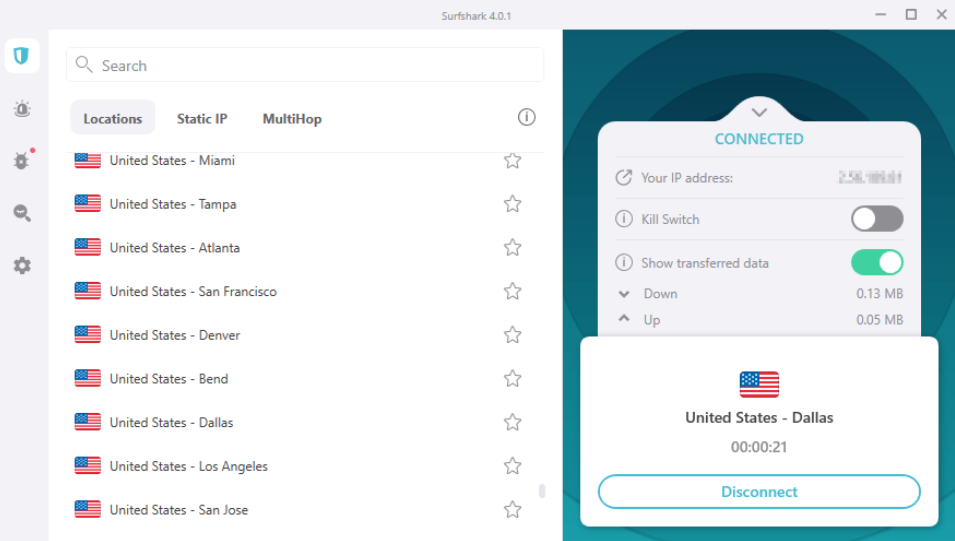
Surfshark’s apps are clean and close to identical wherever you run them, which keeps the learning curve flat across a household. A quick sense of how each lands:
- Windows and macOS carry the full toolkit, Bypasser, MultiHop, CleanWeb, and the kill switch all within easy reach.
- iOS and Android are quick and uncluttered, a single tap to connect, with Bypasser split tunneling available on the Android version.
- Linux has a capable app, more polished than the afterthought many providers ship for the platform.
- Browser extensions for Chrome, Firefox, and Edge handle lightweight, in-browser cover.
- Fire TV and Android TV apps put the unblocking straight onto the living-room screen without a router project.
Support runs through 24/7 live chat, and in my experience it has been responsive and helpful rather than a wall of canned replies. For a service this cheap, a staffed round-the-clock chat is more than you have any right to expect, and it is a meaningful part of why Surfshark suits first-timers as well as it does. The consistency across platforms means that once one person in the house learns the app, they can talk anyone else through it without relearning a thing.
That sameness is easy to undervalue until you live with a mixed household of Windows laptops, an iPhone, an Android tablet, and a Fire TV stick, and find the map, the connect button, and the settings sitting in the same place on every one. It flattens the learning curve to almost nothing and makes the unlimited-device promise practical rather than theoretical, because covering a tenth device is no harder than covering the first. The living-room apps in particular punch above their weight: the Fire TV version means the television gets the same one-tap protection and the same catalog access as your laptop, without a router project or a workaround, which is the sort of thing a household notices.
Setting up Surfshark
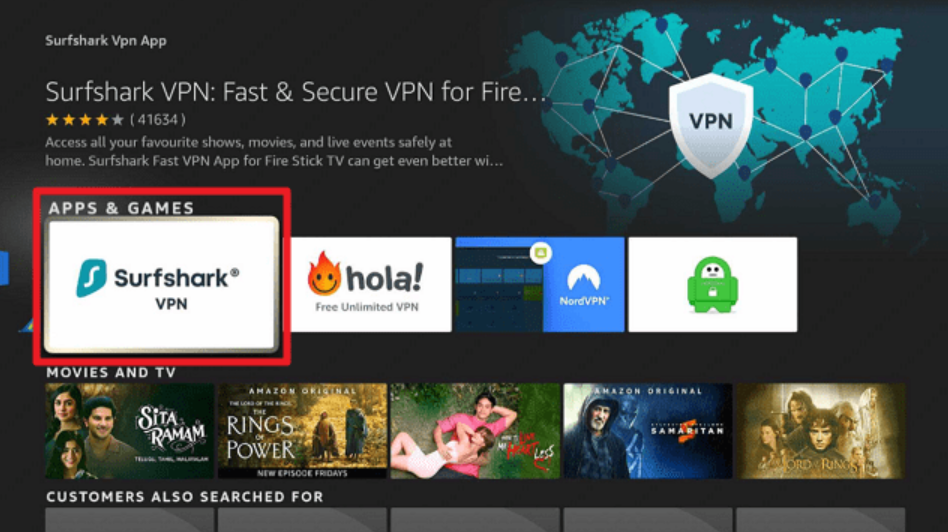
Getting going is a quick job, and the unlimited connections make it quicker because you never stop to decide which devices make the cut. Create an account, download the app to whatever you are holding, sign in, and connect; that alone has you covered. To tune it, a couple of settings repay the minute: turn the kill switch on, flip CleanWeb on to stop ads and trackers at the source, and on mobile, turn auto-connect on so protection kicks in the instant you land on an unfamiliar network. Roll the app out across the rest of your devices whenever you like, since there is no count to keep. For a smart TV that cannot run the app, the smart-DNS feature or the Fire TV app covers it. New to VPNs? My VPN setup guide walks through the groundwork on every platform.
Surfshark pricing and plans
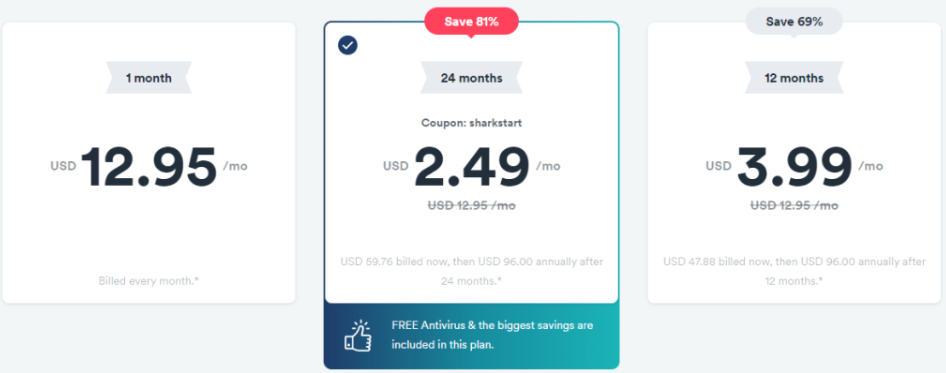
The price is the whole argument, and it is genuinely low. The Starter plan on the two-year term lands near $1.99 a month, usually with a few bonus months on top, which undercuts almost every name-brand rival. Surfshark stacks its plans as Starter, One, and One Plus, where One adds the antivirus and breach alerts and One Plus folds in the Incogni data-removal service. The catch, such as it is, is the monthly plan, which climbs to a steep $15.45 the way short VPN terms always do, so the long plan is the one that makes sense. Payment runs through the usual cards, PayPal, Google Pay, and cryptocurrency, and every plan carries a 30-day money-back guarantee. If you are weighing it against the other budget heavyweight, I put the two head to head in my Surfshark vs FastestVPN comparison.
It helps to know how the three tiers differ before you choose. Starter is the VPN with its full feature set, which is what most people want and where the headline price sits. One layers on the antivirus, the breach-alert service, and the private search tool. One Plus adds Incogni, the data-removal service, on top of all of that. The steps up in price are modest, and the only real trap is the one the whole industry sets: the cheap rate is the introductory price on a long term, and it climbs at renewal, so a calendar note before the first term ends is worth the ten seconds. Even at the renewal rate Surfshark stays among the cheaper names worth buying, but walking in with eyes open beats the small sting of a surprise charge a year later.
| Key facts | Surfshark |
|---|---|
| Price | From about $1.99/mo (2-year Starter); $15.45 monthly |
| Money-back guarantee | 30 days |
| Simultaneous devices | Unlimited |
| Servers | 4,500+ in 100 countries (company figure), RAM-only, 10 Gbps |
| Jurisdiction | Netherlands (Nord Security) |
| Protocols | WireGuard, OpenVPN, IKEv2 |
| Encryption | AES-256 / ChaCha20 |
| Logging | No-logs, audited by Deloitte (2025) |
| Streaming | Netflix, BBC iPlayer, Disney+, Hulu, Prime Video |
| China | Not reliable |
30-day money-back guarantee on every plan.
What is new for 2026
Surfshark has spent the last couple of years growing out of its budget-underdog skin, and a few changes are worth knowing. The server fleet has expanded and moved fully to RAM-only hardware on faster 10 Gbps ports, which is part of why the speed toll has shrunk to near nothing. The Nexus routing layer is newer, knitting the network together so features like Dynamic MultiHop and IP rotation work more smoothly than the old one-server-at-a-time model allowed. The Deloitte audits have continued rather than stopping at a single press-release-friendly check, which is the pattern you want from a no-logs claim. And the product has broadened past the VPN itself into the One and One Plus bundles, turning what was a single tool into a small security suite. None of it changes the core pitch, unlimited devices for very little money, but it is the sort of steady, unshowy progress that has narrowed the distance between Surfshark and the premium names.
How Surfshark compares
Against NordVPN, the trade is clear-cut: you give up a sliver of long-distance speed and the very best China access, and in return you get unlimited devices at roughly a third of the cost. For most households that swap is worth making, and I lay it out in full in my NordVPN vs Surfshark comparison. Against the premium tier, ExpressVPN is faster and more polished but far pricier, and the value gap is hard to justify unless that polish is exactly what you are paying for. For the price of one ExpressVPN subscription you could cover several households on Surfshark, which is the kind of arithmetic that decides most purchases once the spec-sheet excitement wears off. And if your priority is provable, independent privacy rather than value, ProtonVPN with its Swiss base and yearly audits is the name I would point you to instead. Surfshark wins the argument it enters, which is value, and it wins it comfortably.
Reliability and the honest limits
After two years on it, the snags worth naming are few and small, but you deserve them before you buy. China is the real one, the lone place I would not bet a trip on it connecting. The monthly price is the other, genuinely steep at $15.45, which makes the short plan a poor deal and pushes you toward the long commitment to see the value. And the torrenting, while perfectly safe and quick, asks for that one extra tap to pick a P2P server that the most polished rivals automate away.
The larger thing to sit with is not a fault so much as a fact: the Nord Security ownership. It changes nothing about how the app performs, but it does mean the two budget-to-premium giants you might have thought of as competitors now share a parent, and that is worth knowing if independence shaped your shortlist. None of these tip the balance for the value-seeking buyer Surfshark is built for, or it would not have lived on my devices this long, but a review that buried them would be selling rather than informing.
Surfshark FAQ
Is Surfshark safe and trustworthy?
Yes. It uses current encryption, keeps no activity logs, runs its servers from RAM, and has had the no-logs policy independently audited by Deloitte. The one caveat is jurisdiction: it is based in the Netherlands, inside the nine-eyes group, though a genuine no-logs policy leaves nothing to share regardless.
How many devices can Surfshark protect?
As many as you like at the same time. Unlimited simultaneous connections is Surfshark’s defining feature, and it is what makes the service such strong value for families and anyone with a lot of gadgets to cover.
Does Surfshark work with Netflix?
Yes, and across many regional libraries rather than just the US one. Independent testing unblocked every Netflix catalog tried, and it also opens BBC iPlayer, Disney+, Hulu, and Amazon Prime Video, with a smart-DNS option for smart TVs and consoles.
Does Surfshark work in China?
Not dependably. Its Camouflage and NoBorders modes help on most filtered networks, but mainland China’s Great Firewall is the exception, and independent testing reached the same verdict. If China is what you need a VPN for, pick one with a proven record behind the firewall instead.
Is Surfshark good value?
It is the best value in the market right now. At roughly $1.99 monthly across the two-year term, with unlimited devices and a full feature set, nothing else I recommend gives you more for the money. Just commit to the long plan, since the monthly rate is steep.
What is the difference between Surfshark, One, and One Plus?
Starter is the VPN and its core features. One adds an antivirus, breach alerts, and private search. One Plus adds Incogni, the data-removal service that chases brokers to delete your records. For most people the Starter plan is plenty; the higher tiers suit anyone who wants a wider security bundle in one bill.
Does Surfshark keep logs?
No. It runs a no-logs policy that Deloitte has audited, on RAM-only servers that retain nothing when powered down. Its Netherlands base carries no mandatory data-retention law for VPNs, so there is nothing kept to hand over in the first place.
Is Surfshark owned by NordVPN?
They share a parent company, Nord Security, as of 2022, but they operate as separate services with their own apps, networks, and audits. It changes nothing about daily use, though it is worth knowing if avoiding the market leader was part of your reasoning.
Is Surfshark good for torrenting?
Yes. P2P is allowed on the whole network, the kill switch protects your real address if the connection stumbles, and the strong speeds keep downloads quick. The only minor friction is that you may have to choose a P2P-friendly server yourself rather than be routed to one automatically.
What is Camouflage mode?
Camouflage makes your VPN traffic resemble normal browsing so the filters that hunt for VPNs do not flag it, which keeps you connected where plain connections get blocked. Paired with NoBorders mode, it is what makes Surfshark usable on heavily filtered office, hotel, and travel connections.
Is the cheapest Surfshark plan worth it?
For most people, yes. The Starter plan on the long term carries the full VPN and its core features at the lowest price, and unless you specifically want the bundled antivirus or the Incogni data-removal service, you are not missing much by skipping the higher tiers. Just take the two-year term, since the monthly rate is steep.
Does Surfshark slow down your internet?
Barely. Independent testing measured an average download drop of around one percent on nearby servers, which you will not feel, and the loss on long-distance routes stays modest. WireGuard and the fast RAM-only network are the reasons it holds up so well, even with a household sharing the connection.
Can I use Surfshark on a smart TV?
Yes. There are native apps for Fire TV and Android TV, and for other sets that cannot run the app, the smart-DNS feature handles the region-switching for streaming. The unlimited connections mean adding the television costs you no slots, so there is no reason to leave it uncovered.
Is Surfshark better than NordVPN?
It depends on what you weigh. Surfshark is far cheaper and lifts the device limit entirely, while NordVPN edges it on long-distance speed and access inside China. For value and households, Surfshark wins; for the absolute best all-round performance, NordVPN does. They now share a parent company, so the rivalry is friendlier than it once was, and I compare them in full in my NordVPN vs Surfshark piece.
Does Surfshark offer a free trial?
There is no permanent free tier, but the 30-day money-back guarantee works as a no-risk trial: subscribe, use it fully for up to a month, and request a refund if it does not suit you. Some app stores also offer a short free trial on mobile. Either way you can test it properly before committing.
Is Surfshark fast enough for gaming?
On a nearby server, yes. The latency stays low enough that online play feels normal, and the unlimited connections let you cover the console, the PC, and your phone at once. It will not beat a direct connection on ping, but it can help dodge bandwidth throttling and reach game servers in other regions.
Verdict: who should buy Surfshark
Buy Surfshark if you want the most VPN for the least money, and especially if you are covering a household or a heap of devices. It makes a natural first VPN, cheap enough to be an easy yes and polished enough that you will not outgrow it in a month, and the deep feature set means there is room to grow into it rather than away from it. The audited no-logs policy, the RAM-only network, and the genuinely small speed toll mean the old “you get what you pay for” warning simply does not apply here.
The users who should look elsewhere are specific and few: those who need the last sliver of long-distance speed, the ones who must have reliable access inside China, and anyone for whom a provider unconnected to the market leader is non-negotiable, where ProtonVPN and its Swiss base make a better fit. For everyone else chasing value, this is the one, and you can see exactly where it lands against the full field in my best VPNs of 2026.
It is worth grabbing while the current deal is live. Put it on every device you own, every single one of them, run it hard for a full month, and if it is not the right fit for you, the 30-day refund window has your back. After two years of it covering every screen in my life, I have never once had cause to ask for mine, which is about the strongest endorsement I can give a VPN I keep paying for by choice.
30-day money-back guarantee, cancel anytime.
Leave a Reply
You must be logged in to post a comment.