

Some VPNs sell themselves on excitement, on being the fastest or the most loaded or the cheapest thing you have ever seen. StrongVPN sells the opposite, and there is an underrated audience for that. It has been running since 2005, which in this industry is close to ancient, it does the everyday job without fuss, and it almost never turns up in the news for either good reasons or bad. For a certain kind of buyer who just wants the connection to hold and the support line to pick up, that steadiness is the entire pitch. My rating: 3.9 out of 5.
The verdict before the detail: StrongVPN is a dependable, beginner-friendly VPN with excellent support and a Smart DNS feature that earns its keep on devices a VPN app cannot reach. It is held back by a United States base, a small server network, and a no-logs policy it has never put in front of an outside auditor. If you value simplicity and a human on the other end of the chat over feature depth and provable privacy, it deserves a place on your shortlist. If you want the last word in either speed or verified privacy, I will point you elsewhere before the end.
30-day money-back guarantee, cancel anytime.
Table of Contents
StrongVPN at a glance
Two decades in business have left StrongVPN with a clear character: unflashy, reliable, and aimed squarely at people who do not want a hobby attached to their VPN. The balance sheet looks like this.
What it gets right:
- A clean, no-clutter app paired with some of the most responsive customer support in the lineup.
- Smart DNS for streaming on televisions and consoles with no VPN app of their own.
- Up to 12 simultaneous connections on a single account, more than most capped rivals allow.
- Scramble obfuscation, which gives it a working track record on networks that try to block VPNs.
- Speeds that hold up reasonably even on servers a long way from home.
What I would change:
- It is based in the United States, inside the major intelligence-sharing alliances.
- The no-logs policy has never been checked by an independent auditor.
- The server network is small, spread across roughly 30 countries.
- Mid-tier pricing without the rock-bottom appeal of the budget names or the polish of the premium tier.
Simple by design
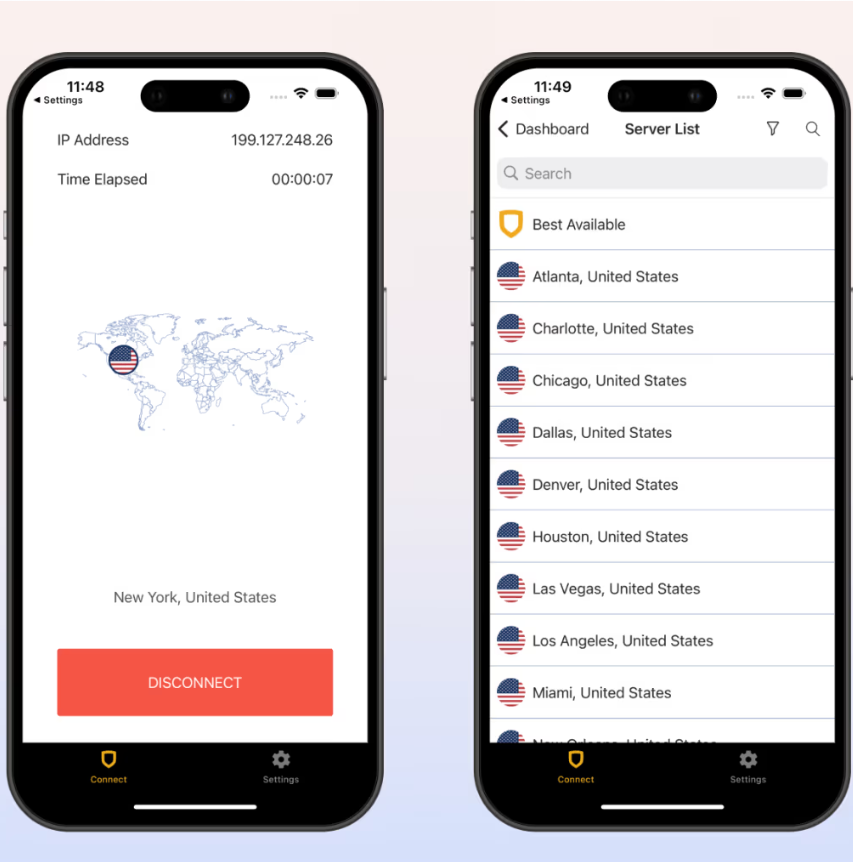
StrongVPN’s biggest strength is how little it asks of you. The apps for Windows, macOS, iOS, and Android are stripped down to a connect button and a server list, with very little you could misconfigure even if you tried. For a first-time VPN user that plainness is a feature rather than a shortcoming, and it is the reason StrongVPN lands on my best VPNs for beginners list. There is no wall of toggles to decode before you are protected, which is exactly what most people want and almost nobody admits to wanting.
Backing that up is support that genuinely stands out, and I do not say that lightly about an industry where “24/7 live chat” usually means a script and a long wait. The StrongVPN team has been quick to reach and useful the times I have leaned on it, the sort of help that matters far more than any spec sheet the first night something refuses to connect. If you are new to all of this, my guide to getting a VPN running covers the basics, but with StrongVPN you may not need it, because the app does the thinking and the support desk catches whatever falls through.
Speed on its servers
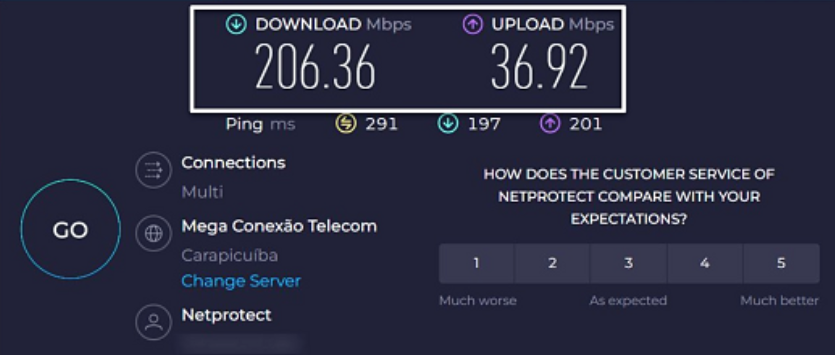
Speed is a pleasant surprise here, and not the place I expected a small, older provider to shine. On nearby servers StrongVPN is quick enough that the connection disappears into the background, with streaming, calls, and browsing all running as though nothing sat between you and the open internet. What stands out is how it holds up at distance, which is where a lot of small providers fall apart and StrongVPN mostly does not.
The independent numbers back the felt experience. In testing, StrongVPN landed inside the 10 to 20 percent speed drop that the top VPNs post on nearby servers, which is genuinely good company to keep, though one close server did dip into double-digit losses, so it is not flawless. Gaming tells the same story: their closest server returned a ping of around 17 milliseconds, low enough that online play feels normal as long as you have a server near you. WireGuard does most of the heavy lifting, and on a healthy base connection I have had no complaints streaming in HD or pushing work files through it.
Theceiling is the network. With servers in only about 30 countries, your nearby options thin out fast once you leave the major regions, and a server on the far side of the world will never match one down the road. For someone who mostly connects close to where they live, that rarely bites. For a constant long-haul traveler, the small footprint is the thing most likely to frustrate you, and one of the bigger networks will serve you better.
Who StrongVPN is for
StrongVPN rewards one kind of buyer and frustrates another, so it is worth naming both plainly. The clearest fit is the first-time user who wants protection without a learning curve and values knowing that a real person will help if something goes sideways. Households fit well too, since 12 connections cover a lot of phones, laptops, and tablets, and the router option stretches that to everything else under the roof.
To put a face on it, the buyer I most often steer toward StrongVPN is someone setting up their first VPN for a parent or a partner who is not especially technical. They want the streaming to work on the living-room television, they want one subscription to cover everyone’s phones and laptops, and above all they want to know that if something breaks, a real person will sort it out rather than a script that wastes twenty minutes. StrongVPN answers all three, and the missing audit that would trouble a privacy obsessive simply never enters that buyer’s thinking.
It is a weaker pick for two groups in particular. If verified privacy is the thing you care about most, the missing audit and the United States base will sit badly with you, and there are providers that answer both worries directly. And if you chase raw value, the budget names give you more network and a lower price for the same money. Knowing which camp you fall into turns StrongVPN from a maybe into a clear yes or a clear no, which is the most useful thing a review can do for you.
Streaming and Smart DNS
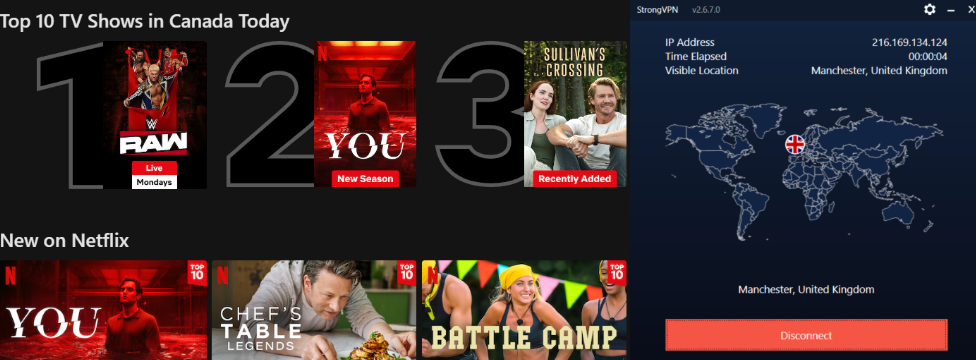
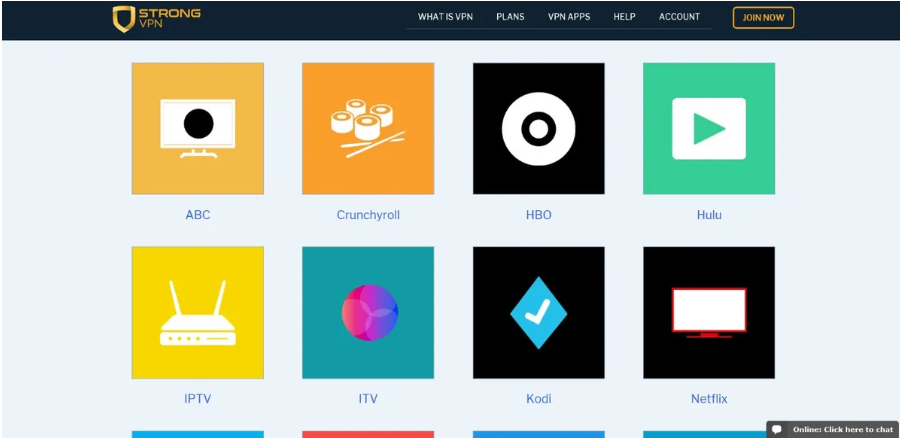
Streaming is one of StrongVPN’s strengths, and it reaches more services than its modest profile suggests. Across its servers it has unblocked Netflix, Disney+, Hulu, HBO’s Max, and Amazon Prime Video for me, and independent testing pushes the list further still, wit htesting adding BBC iPlayer, ITVX, Channel 4’s All 4, and Crunchyroll to the column of services it opened. That breadth, especially the British catalogs, is more than a lot of bigger names manage, and it earns StrongVPN a spot on my best VPNs for streaming list.
On a long stretch working out of a rented flat in Valencia, the British channels were what I missed most, and StrongVPN kept ITVX and BBC iPlayer loading through the evenings, which is not a sentence I can write about every name in this lineup. The detail that sold me was the living-room television: the flat’s smart TV got the same access my laptop did, so the football played on the big screen instead of hunched over a 13-inch one. That is where the next feature comes in.
The standout is Smart DNS, the single feature that would most tempt me toward StrongVPN over a cheaper rival. It opens geo-blocked content on the hardware a VPN app never reaches: the televisions, games consoles, and streaming sticks that make up half of most living rooms. It works by redirecting only the DNS lookup and leaving your traffic unencrypted, so it buys you access rather than protection, but for putting a smart TV onto a foreign catalog without touching your router’s firmware, that is the right trade. Most budget providers skip it altogether, so seeing it on a mid-priced VPN genuinely counts for something.
Security, encryption, and obfuscation
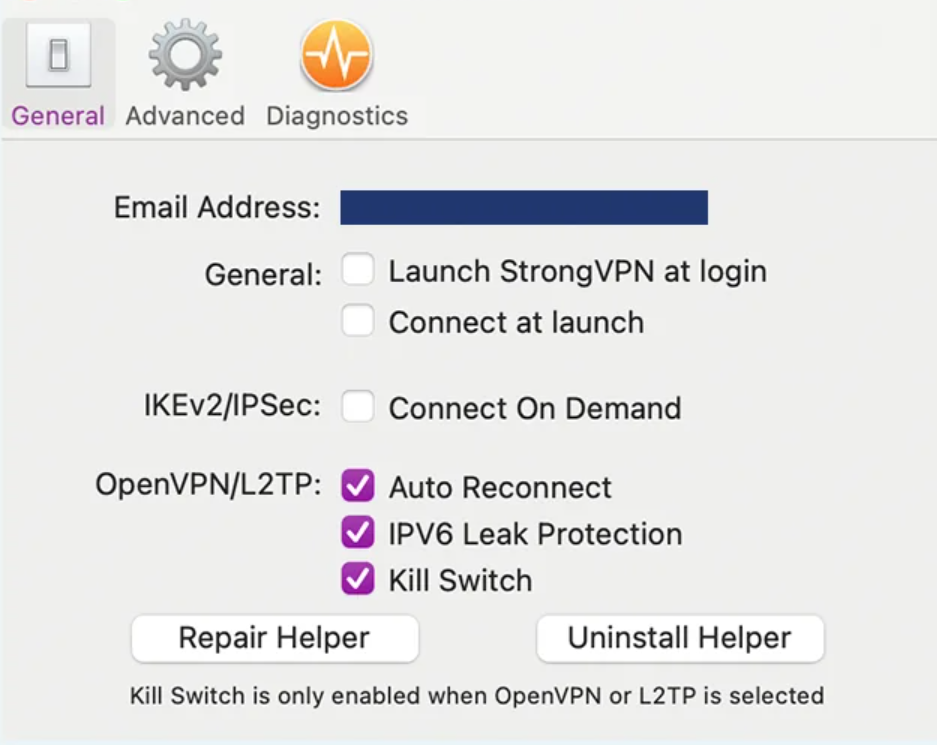
The security toolkit covers the essentials and skips the gimmicks. StrongVPN encrypts with AES-256, the same standard the serious providers rely on and the same one sitting behind online banking, and it offers the three protocols that matter, with WireGuard for speed, OpenVPN for the most thoroughly tested option, and IKEv2 as a steady mobile fallback when you hop between networks. A kill switch sits on top, and if the tunnel ever falters it pulls your internet down with it so nothing slips onto the open network in that half-second.
The feature worth singling out is Scramble, StrongVPN’s obfuscation tool, which disguises your VPN traffic so it looks like ordinary web traffic. On a network that actively hunts for and blocks VPNs, that disguise is the difference between a working connection and a dead one, and it is the reason StrongVPN has a usable record in places where censorship is heavy. It is the kind of feature you ignore until the one evening every other VPN you own gives up on a hostile network, and then it is the only thing on the screen that matters.
Privacy, the US base, and the missing audit
This is where StrongVPN gives ground, and a review has to sit with it rather than hurry past. The company keeps a no-logs policy, meaning it does not record the sites you visit or the files you move, and safetydetectives’ review reads its policy the same way I do, as a genuine commitment not to store your activity. So far, so good. The trouble is verification. StrongVPN is based in the United States, which sits at the center of the major intelligence-sharing alliances, and it is owned by Ziff Davis, a large American media company.
It helps to be precise about what the United States base changes, because the worry is easy to overstate. A provider can only hand over what it holds, so a no-logs policy that genuinely keeps nothing has nothing to surrender no matter which government comes knocking. What the US jurisdiction adds is the possibility of a gag-bound legal demand and the fact that there is no court ruling, the way there is for one or two rivals, proving StrongVPN’s policy has survived a real-world test. Combine the unproven policy with the jurisdiction and you get the actual gap: not evidence of wrongdoing, but a thinner safety net than the audited, offshore providers offer. Whether that matters is entirely a function of your threat model, and for most everyday buyers it sits well below the things they will notice.
Server network, owned servers, and restrictive countries
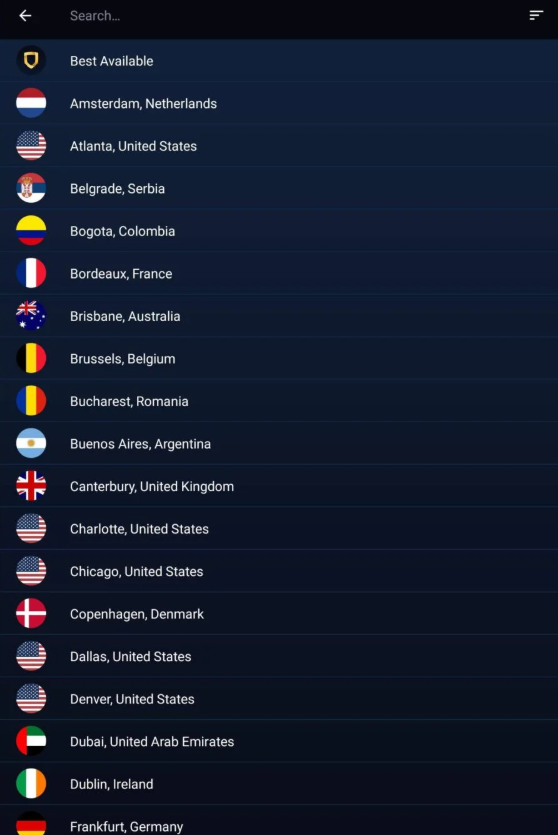
StrongVPN runs a small network, somewhere around 950 servers across roughly 30 countries, which is modest next to the thousands the big providers operate. For everyday use the size matters less than the placement, and the major hubs are covered, but the thin spread is the clearest sign of the budget behind the brand and the reason far-flung connections have fewer fallbacks. There is, though, a real privacy upside hiding in that small network: testers notes that StrongVPN owns and operates its entire server fleet rather than renting from third parties, which removes the kind of outside access that has caused trouble for other providers. Controlling your own hardware is a genuine advantage for a privacy tool, and not every bigger network can claim it.
On heavy censorship, StrongVPN does better than its size would suggest, and the credit goes to Scramble. And testing found that it works inside mainland China, which is a bar most VPNs fail, and the obfuscation is what carries it past the deep filtering there. I would still install and confirm it works from home, before the Great Firewall is between you and the download page, rather than trust it blind once you land, since the filtering there can change overnight. Even so, a working record there is more than most of this lineup can claim. For ordinary filtered networks, office blocks, and hotel captive portals, it copes without drama.
Torrenting and devices
Torrenting is allowed across the network rather than penned onto a handful of servers, and with the kill switch guarding your real address and decent speeds underneath, it is a reasonable choice for downloading. The small network is the only real limit, since it means fewer P2P-friendly options than the bigger providers offer, I rate its torrenting highly, and in practice I have run downloads on it without trouble. The 12 simultaneous connections are generous, comfortably more than the five or ten most capped rivals allow, so a single subscription covers a whole household with room to spare, even if it stops short of the unlimited connections a few competitors give you. For gaming, the low nearby ping keeps casual online play smooth, though it is not pitched as a gaming tool.
StrongVPN for households and shared use
A household is where StrongVPN’s strengths add up. Twelve simultaneous connections comfortably cover a family’s phones, laptops, and tablets without anyone having to log out to make room for someone else, which is a small thing until you have done the logging-out dance on a phone with one bar of signal. When the device count runs past that, the router option absorbs the overflow: install StrongVPN once at the router and every gadget on the network rides the same protected connection while it still counts as a single device.
The living room is where it pulls ahead of cheaper rivals. Between the router support and Smart DNS, the televisions, consoles, and streaming sticks that defeat a lot of budget VPNs are covered here without a fight, so the person who set everything up does not get a stream of complaints about the TV not working. Pair that with the support desk for the inevitable moment a relative cannot get something running, and StrongVPN becomes one of the lower-stress choices for the household member who ends up as everyone else’s tech support. It will not turn that role into a pleasure, but it makes it a good deal quieter.
The apps, platform by platform
StrongVPN keeps its apps consistent and uncluttered across the platforms that matter, which is part of why it feels so approachable. Here is how each one lands in daily use.
- Windows and macOS both give you the full app, with the protocol picker, Scramble, and the kill switch within easy reach.
- iOS and Android connect in a tap and keep the same clean layout, so the muscle memory carries straight over from desktop.
- Smart TVs and games consoles lean on Smart DNS rather than a native app, which is how StrongVPN puts streaming onto hardware with no VPN client of its own.
- Routers are supported directly, letting one install protect every device on the network at once, including the ones with no app of their own.
The consistency is the underrated part. Learn the desktop app and the phone version asks nothing new of you, which makes StrongVPN an easy thing to set up for a less technical relative and then leave alone. That kind of low-maintenance reliability is the whole reason the brand has lasted as long as it has.
Customer support, up close
Most VPN reviews give support a single line and hurry on, but with StrongVPN it is too central to skip, because it is the thing that most separates it from cheaper rivals. The help runs through 24/7 live chat, email, and a deep knowledge base of step-by-step guides. What sets it apart is not the list of channels, which everyone advertises, but the quality of the answers once you reach a person.
The time it mattered most to me, I could not get Smart DNS working on an older smart TV the night before a long trip, and the agent talked me through the network settings on the set itself, something they had no real obligation to do, until BBC iPlayer finally loaded. They knew the product, they skipped the usual ritual of three pointless restarts, and they stayed on until the thing worked. Plenty of providers can point you at a help article; far fewer will sit with you until the problem is gone. For a less technical buyer that patience outweighs a longer spec sheet, and it is the single biggest reason I would hand StrongVPN to a relative over a cheaper rival with a faster network and a worse help desk.
Setting up StrongVPN
Getting started is a short job. Sign up, install the app for your device, log in, and tap connect, which on its own is enough to be covered. If you want to tune things, the two settings worth a look are switching the protocol to WireGuard for the best speed and turning on the kill switch so a dropped tunnel never exposes you. For a television or console with no app, set up Smart DNS through your account rather than hunting for a download, and for whole-home coverage, follow StrongVPN’s router instructions to protect everything through a single connection. The support desk is quick to help if any of that snags, which removes most of the anxiety a first-timer feels about the whole exercise.
Extra features, and what is missing
StrongVPN’s feature list is short, which is partly the appeal and partly the limit. On the present side, Scramble obfuscation and Smart DNS are the two that earn their place, and direct router support extends the whole service to hardware that has no app of its own. There is no sprawling menu of paid extras to wade through, which fits the uncluttered character of everything else about it.
What is absent is worth naming so nothing catches you out later. You will not find layered routing that chains two servers for a second hop, the built-in ad and tracker blocker the bigger names bundle in, or a dedicated-IP option. Above all there is no published independent audit, the absence I keep circling because it is the one that genuinely shifts the privacy maths rather than just trimming the toolbox. None of these sink the everyday case StrongVPN is built for, but if you want a deep drawer of privacy tools to play with, this is not the provider holding it. It does a small number of things and does them steadily, which is either exactly what you want from a VPN or exactly what you do not.
StrongVPN pricing and plans

StrongVPN sits in the awkward middle on price. The annual plan works out to a little under $4 a month, which is more than budget names like Surfshark and Private Internet Access charge yet without the premium polish of the top tier, and the monthly plan costs the usual premium on top. Promotions move the number around, so the headline rate you see may be sharper than the standard one, but the everyday positioning is mid-market. There is no sprawling menu of paid add-ons, which fits the no-frills character of the whole service, and every plan comes with a 30-day money-back guarantee. You can pay by card or PayPal. The value here is the simplicity and the support, not the sticker price, and that is the frame to judge it by.
| Key facts | StrongVPN |
|---|---|
| Price | A little under $4/mo (annual plan); promos vary |
| Money-back guarantee | 30 days |
| Simultaneous devices | 12 |
| Servers | 950+ in 30+ countries, owned network (company figure) |
| Jurisdiction | United States (Ziff Davis) |
| Protocols | WireGuard, OpenVPN, IKEv2 |
| Encryption | AES-256 |
| Logging | No-logs (not independently audited) |
| Streaming | Netflix, Disney+, Hulu, Max, Prime Video, iPlayer; plus Smart DNS |
| China | Works via Scramble (test before travel) |
30-day money-back guarantee.
How StrongVPN compares
Set against the budget champions, the trade is straightforward. Surfshark and Private Internet Access both give you a larger network and a lower price, with Surfshark adding unlimited devices and an audited policy on top, so on pure value StrongVPN loses that contest. Where it answers back is support and Smart DNS, the human help and the living-room streaming that the cheaper names often skimp on. Against the premium tier, NordVPN and ExpressVPN are faster, larger, and audited, and they cost more to match, so if performance and verified privacy lead your list, they are the better spend. StrongVPN’s lane is narrower and clearer than any of them: a simple, steady, well-supported VPN for someone who prizes a quiet life over a long feature list, and you can see where it sits against the whole field in my best VPNs of 2026.
Two decades of staying power
It is easy to overlook how unusual StrongVPN’s longevity is. Launching in 2005 makes it one of the oldest VPNs still standing, from an era before streaming unblocking and audited no-logs claims were even part of the conversation. A great many providers from that period folded, got bought and gutted, or stopped maintaining their apps. StrongVPN kept going, eventually landing under Ziff Davis, the same American media group that owns IPVanish, and it has stayed actively developed rather than left to rot.
That endurance cuts both ways, and a review should say so. On one hand, a service that has survived twenty years of a brutal market and kept its apps current has earned a certain trust that a flashy newcomer has not; it is not going to vanish next quarter with your prepaid year. On the other, longevity is not the same as leadership, and StrongVPN has spent much of that time a step behind the front-runners on network size, audits, and features. The fair read is that it has aged into a steady, competent middle-of-the-pack option, which is a more useful thing to be than the marketing of newer rivals would have you believe.
Reliability and the trade-offs
After living with it, the things that nag are the ones already named, gathered here so you can weigh them in one place. The missing audit is the big one for me, not because I distrust the policy but because every serious rival has closed that gap and StrongVPN has not. The United States base compounds it for anyone whose threat model includes legal pressure, even though a service that truly keeps no logs has nothing to surrender. And the small network is the practical limit, the thing you will feel first if you travel widely or want a server somewhere unusual.
What you get in return is the steadiness the whole review keeps circling back to. The connection holds, the app stays out of your way, and the support desk answers when you need it. None of those make headlines, which is exactly why StrongVPN gets overlooked, and exactly why the buyer it suits tends to stay once they find it. A review that pretended the trade-offs away would not be doing you any favors, but neither would one that buried the genuine strengths under them.
StrongVPN FAQ
Is StrongVPN safe to use?
The core protections are solid: AES-256 encryption, a kill switch, and Scramble obfuscation, all sitting on top of a no-logs policy. The caveat is verification rather than the technology. That policy has never been independently audited, and the company is based in the United States, so the privacy claim rests on trust instead of proof. For everyday use that is reasonable; for a strict privacy threat model it is a gap.
Does StrongVPN keep logs?
It says no, and reviewers who have read the policy agree it commits to storing neither your browsing nor your downloads. The asterisk is that the claim has not been checked by an outside auditor, unlike several rivals, so you are taking StrongVPN at its word rather than verifying it through a published report.
Does StrongVPN work with Netflix?
Yes, reliably. It unblocks Netflix alongside Disney+, Hulu, Max, Amazon Prime Video, and a strong set of British services including BBC iPlayer and ITVX. Its Smart DNS feature also extends that access to televisions and consoles that have no VPN client of their own, so the living-room screen gets the same catalogs your laptop does, and the British channels in particular hold up better than on a lot of bigger names.
Does StrongVPN work in China?
It can. Independent testing has found StrongVPN working inside mainland China, with its Scramble obfuscation carrying it past the censorship that stops most VPNs. As with any provider there, get it working from home first, because the filtering can change overnight once you arrive.
How many devices does StrongVPN allow?
Up to 12 at the same time, which is more generous than most capped providers and enough for a typical household. If that is still not enough, installing StrongVPN on a router covers every device on the network through a single connection.
What is Smart DNS on StrongVPN?
Smart DNS lets you reach geo-blocked streaming on hardware with no VPN client, such as smart TVs, games consoles, and streaming sticks. It redirects only the DNS lookup and leaves your traffic unencrypted, so it is built for access rather than protection. For putting a television onto a foreign catalog, that is exactly the trade you want.
Is StrongVPN good value?
It is fair rather than cheap. At a little under $4 a month on the annual plan it costs more than the budget names, and its value comes from the support quality, the Smart DNS feature, and the 12 connections rather than from the price. If the lowest sticker is your priority, a provider like Surfshark gives you more for less.
Is StrongVPN good for beginners?
Yes, it is one of the better first VPNs. The apps are stripped down to the essentials with nothing to misconfigure, and the customer support is responsive and patient, which is exactly what a newcomer wants the first time a connection misbehaves.
Verdict: who should buy StrongVPN
Buy StrongVPN if you want a simple, reliable VPN with first-rate support and useful streaming tools, and you do not need a vast network or an audited privacy policy to feel comfortable. It is a natural fit for newcomers, for households spreading a dozen connections across their devices, and for anyone who prizes steadiness and a responsive help desk over the longest feature list. The Smart DNS, the Scramble obfuscation, and the surprisingly capable streaming all add up to more than the modest profile suggests.
Look elsewhere if verified privacy is your hard line, where the missing audit and United States base count against it and a Swiss provider like ProtonVPN fits better, or if you are a bargain hunter who can get a bigger network for less from Surfshark or Private Internet Access. StrongVPN will not excite you, and it is not trying to. What it will do is hold a connection, stay out of your way, and answer the phone, and you can see exactly how it stacks up in my best VPNs of 2026.
If dependable VPN is what you are after, this is a fair buy. Take the annual plan to get the better rate, lean on that excellent support whenever you need it, and fall back on the 30-day guarantee if the fit turns out wrong. Reliable and overlooked is a perfectly good thing for a VPN to be.
30-day money-back guarantee, cancel anytime.
Leave a Reply
You must be logged in to post a comment.